







Data is incredibly valuable. Especially your own. For local businesses, it’s the linchpin of your marketing strategies. The issue you’ve probably always had is accessing that data in a way that works for you.
Which is why we’re happy to be launching our brand new MCP server. We want you to be able to access all the data you need on your locations, wherever it is you choose to use it.
This forms part of our new AI Roadmap, which forms part of our commitment to helping you get more from BrightLocal.
What is an MCP Server?
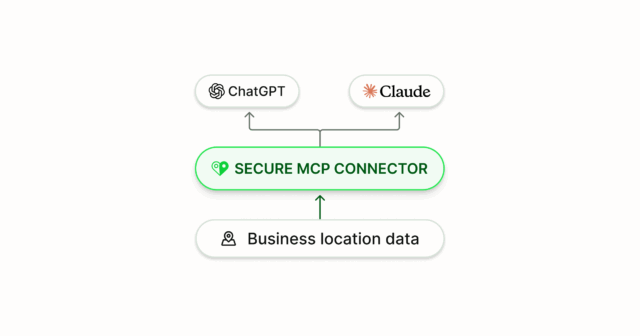
An MCP (Model Context Protocol) Server is a service that allows you to connect a tool, like BrightLocal, to AI tools like ChatGPT, Claude, and n8n.
It allows you to connect your BrightLocal account to a Large Language Model (LLM) or AI tool, and then use the AI tool to ask questions or take action. This shares your account data with the LLMs and tools.
For BrightLocal, this means you can ask questions about that data, such as ‘What is our best performing location?’. Later, you’ll be able to take action too, with prompts like ‘Update the opening hours of our main street branch to…’.
Once you’ve connected the tool to BrightLocal, you can do all of this without even opening BrightLocal. Letting you stay in ChatGPT, Claude, or the LLM of your choice.
In the words of Ed Eliott, our Tech Advisor & Co-founder:
“The MCP server enables you to have natural language conversations with your BrightLocal account. It enables you to get data from your account in the way you want, and to derive insights from that data.”
In other words, you can take the data from your BrightLocal account to your favorite LLM. This then lets you start these natural language conversations and really interrogate your data.
Then, in the next round of updates, it’ll also enable you to add locations, set up reports, and make changes to your locations and reports.
The BrightLocal MCP currently works with a number of LLMs, depending on the plan you have with that tool:
- ChatGPT – plan dependent
- ClaudeAI – Pro plan or Teams account
- Mistral – any plan, including a free plan
You can connect with n8n for workflow automation.
Examples of Use
If that sounds a little complex, then let us run you through some use cases to help you get your head around the implications.
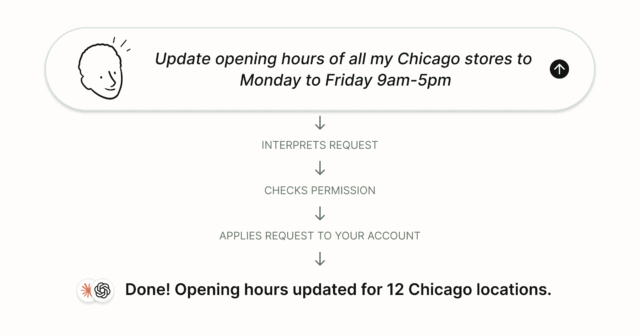
Rather than simply opening a report dashboard, now you can attach your favorite LLM and prompt it to do things like:
- “Give me a list of all my BrightLocal locations based in New York.”
- “List the locations in my BrightLocal account that have received a one-star review in the last 2 weeks.”
- “Update the opening hours for all of my Chicago stores to Monday-Friday, 9-5 pm.”
- “Add ‘restaurant’ as an additional keyword to all of my LSG reports.”
- “Give me an overview of the review sentiment, highlight strengths and weaknesses, and present some opportunities based on recent reviews from the Le Bernardin location in my BrightLocal account.”
Why have we made one?
We want our customers to get the most out of their data and use their accounts in a way that works for them.
We recognize that many people now conduct a significant portion of their work using LLMs, so we’ve introduced our MCP to enable you to do the same. Once it’s set up, you don’t even need to log in to your BrightLocal account. You can do everything you need in your AI account.
That even includes taking action. It’s not just for running reports. You’ll be able to add locations, configure reports, and make changes to push out across your profiles, too.
How can you access the MCP?
Our MCP Server forms part of BrightLocal Anywhere, our package designed to help you take your BrightLocal data wherever you need it, via LLMs or APIs.
To access the MCP server and BrightLocal anywhere, you’ll need two things:
- An active Grow Plan and access to BrightLocal Labs
- Access to one of the supported AI platforms
For guidance on setting up the supported tools, visit our help center:
How can you get your hands on BrightLocal’s AI features?
Our MCP Server and BrightLocal Anywhere are just the beginning of our new AI features in 2026.
You can discover our plans in our AI Roadmap.
Get Early Access with BrightLocal Labs
If you want to get your hands on features early and join our beta environment, then you can sign up for BrightLocal Labs. This gets you priority access to new features and direct input to help shape the product.
If you’re an existing customer who wants to request access to BrightLocal Labs, contact support.