









Meaningful SEO takes time. Time for review management, time to audit your Google Business Profile, and time to build citations. But truthfully, some of that could just be busy time.
Whether you’re a small business owner targeting local traffic in your hometown or a local SEO agency with dozens of profiles to take care of, not every hour you spend optimizing your listings and growing your local presence will be productive. Our research found that 54% of small business owners manage marketing on their own. So on top of running their business, they’re having to educate themselves on local SEO, paid, and social media, and find time to actually do it.
Especially today, when it’s easier than ever to work smarter with local SEO automation.
Automation is often a byword for AI, but here, we aren’t talking about leaving it all to Claude or relying on a few basic ChatGPT prompts to rush up a review request. To truly automate local SEO without jeopardizing visibility, you need to be strategic about the local SEO software you use to carry out certain tasks, the jobs you assign to AI (spoiler: right now we recommend just one thing), and what you outsource to a human team.
Read on for the seven processes you can and should automate to save time, increase effectiveness, and boost efficiency across one or multiple locations.
1. Audit your citations without a manual re-check every time
Auditing your existing citations isn’t a job to entrust to AI. Instead, use a scheduled, rule-based automation to ensure all citations are found, and then carefully checked for accuracy against your business information.
You can do this yourself, but manually finding and verifying each citation could run into weeks of mind-numbing work. Even then, you still run the risk of not spotting every inconsistency or inaccuracy.
A simple way to automate this search is a tool like Citation Tracker. This will find and monitor citations on your behalf. Just input your business information, set your report frequency, and the recurring scan will flag NAP errors and inconsistencies on schedule, removing the burden of manual audits and checks.
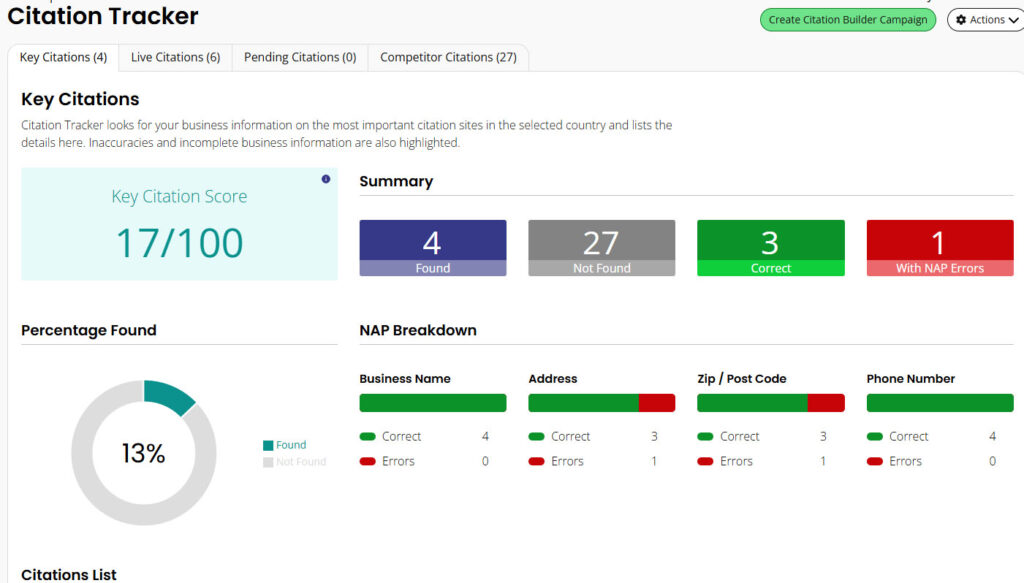
Getting these errors fixed doesn’t have to be an arduous task either.
2. Get your citations built and fixed for you
Ok, this one isn’t technically an automation, as sometimes, a human touch is the best option for ensuring quality and accuracy. But it is a done-for-you service with accurate, consistent citations, built by a knowledgeable team. So you can still concentrate on doing your own work.
Manually building new citations could eat up much more time than you realize. You’ll first need to identify relevant citation-building directories or platforms, run a check for existing listings, create an account, and then input your business NAP with laser precision each time.
Local citation build solutions, like Citation Builder, offer a smart middle ground. You can share business details or your Google Business Profile link, and we’ll get to work. First, by running a thorough audit to build a picture of each existing citation, and then by finding gaps in those listings. A team of citation specialists will submit your business information to relevant sites, directories, data aggregators, and platforms where you don’t yet have a citation, and then provide a detailed report and login information so you can take full ownership of each listing and keep it updated moving forward.
Other services offer manual, hybrid, and fully automated options.
3. Stop manually re-entering updates on multiple platforms
Local SEO automation makes particular sense for business updates on listings and directories. The right piece of software can push out changes to multiple platforms simultaneously, handling the task much more efficiently than a human ever could.
If just one part of your business information changes, like seasonal opening hours, you’ll immediately find yourself with a sizable update job on your hands. Logging in to your Google Business Profile and quickly updating one or two fields doesn’t take too much time. But will you also remember to update Yelp, Bing Places, and every other listing? Manually logging in and out could take weeks, and there’s no guarantee you’ll get to every listing.
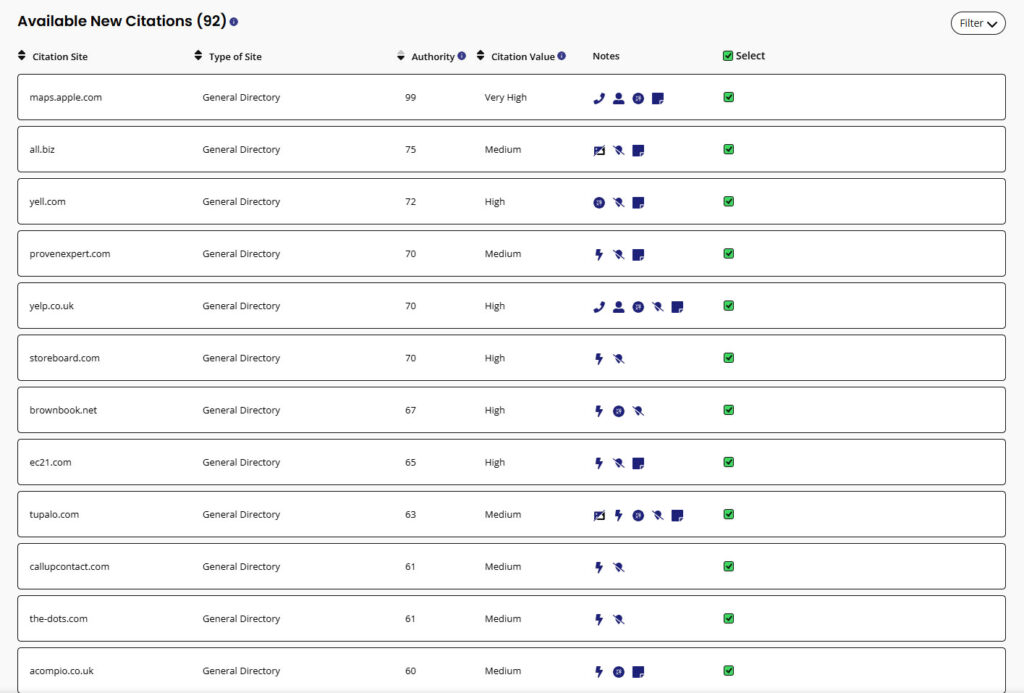
To avoid all those tedious manual SEO updates, plug your business information into a listings management tool, input your NAP changes, then sync in real time. The tool’s direct API connections to Google Business Profile, Apple Maps, and Bing Places push the updates out in minutes. Third-party edits, such as changes suggested by Google, are also flagged for review in real time as they’re detected, so you can quickly check, approve, or discard updates to keep your listings accurate and helpful.
4. Stop chasing customers for reviews one by one
Automating your review requests is quickly and easily achieved with the right piece of software.
If you want to go down the manual route, you could make a polite request at your point of sale, call, text, or include a review request in a follow-up email. That alone could require hours of effort, notwithstanding tracking outcomes and chasing those who don’t take action.
You can use review management software to fully automate the process of asking for reviews and following up with anyone who hasn’t responded within a set timeframe. The platform invites customers to share their stories through branded requests via automated emails, SMS messages, or QR codes. You can also choose to request internal feedback and a public review, or a public review only.
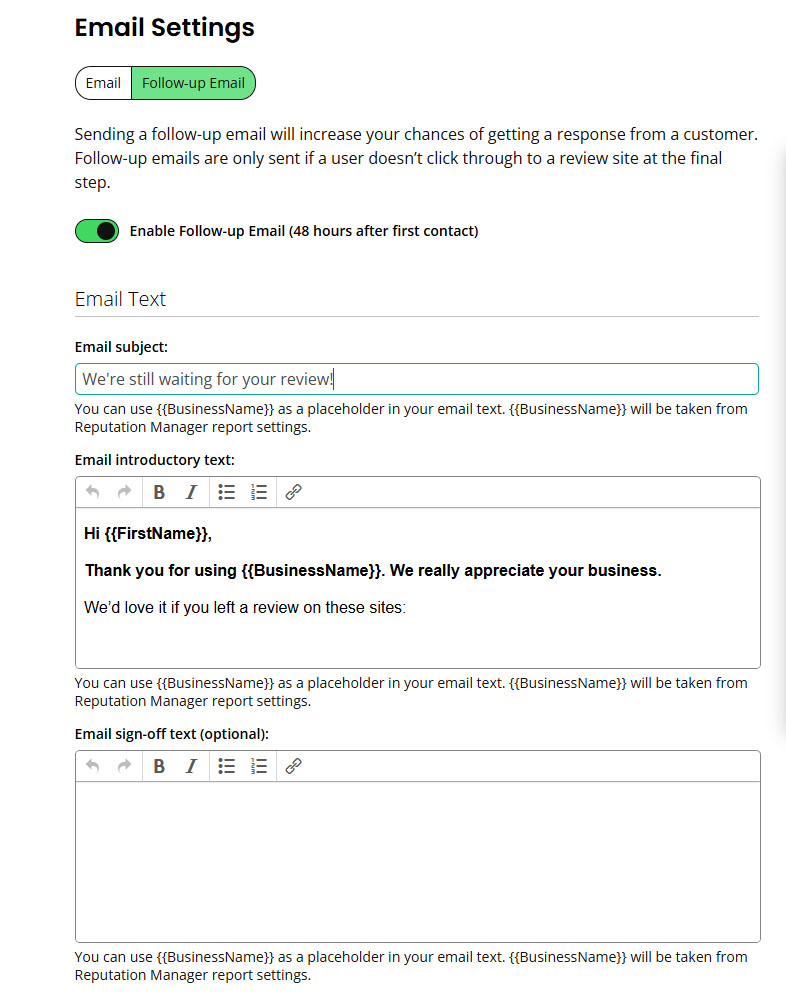
Set up your template email with your preferred subject line, body copy, and signature – or use the AI-generated text that’s prepopulated for you. Connect your preferred review sites, and your review request template is ready to go out to all new customers.
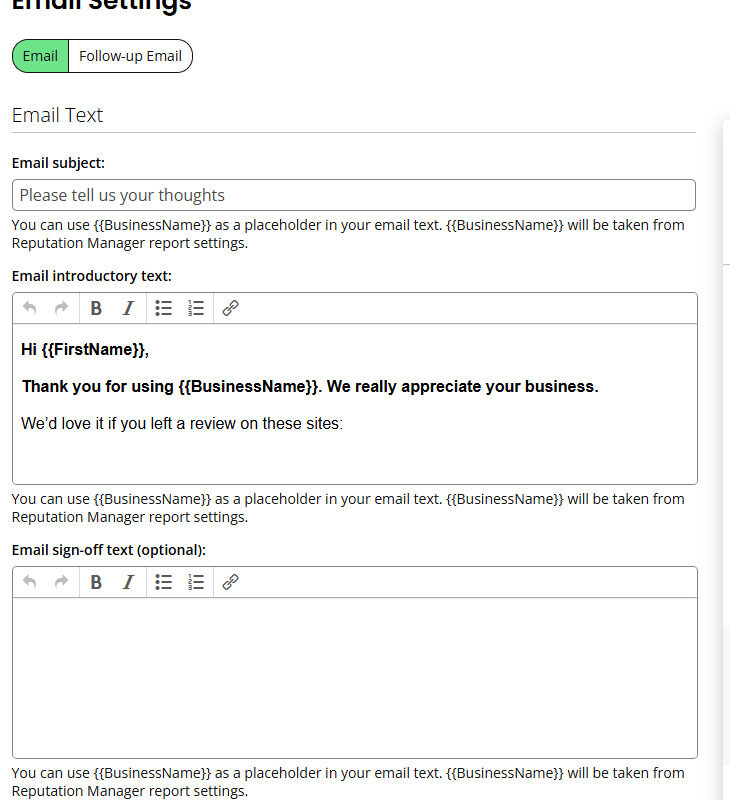
Turn on the follow-up email feature to send an automatic reminder 48 hours after the original request if the recipient hasn’t clicked through to leave a review.
5. Stop managing review responses one-by-one
How do you keep track of what everyone is saying about you when the Internet is full of voices, opinions, and review platforms? Local SEO software.
Even if you have a team of people to manage review responses, that resource stretched across multiple locations and potentially hundreds of new reviews each day, still may not be sufficient.
Reputation Manager performs two local SEO automation tasks to take this job off your list. First, it pulls in all reviews from many sites into one dashboard. As new reviews are created, the review management software pulls them into the feed, so you don’t need to check review platforms manually one by one.
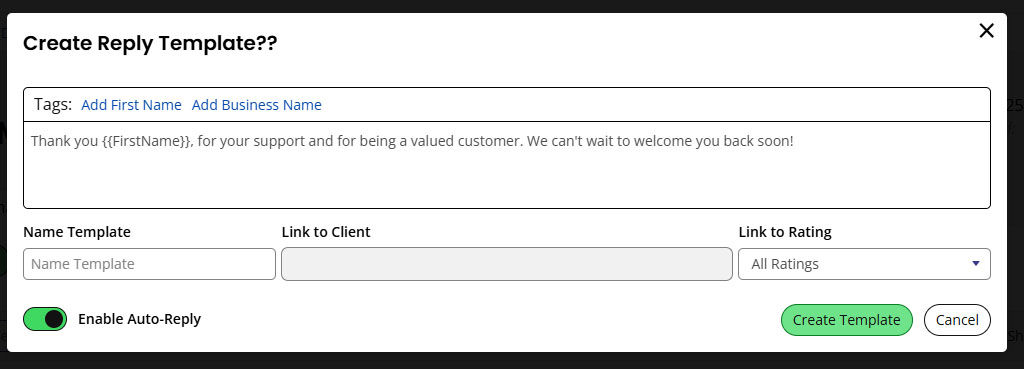
The second automated local SEO process happens next. For each response landing in the feed, a templated response can be published within a set time window.
Toggle on auto response, edit the default text if desired, and then save the automation. The platform will then deal with responses on your behalf for each new review, across all review sites you’re monitoring, with no further manual input required.
6. Schedule your local ranking reports to avoid manual runs
Updating local ranking reports can be easily entrusted to automation. Simply load your keywords into a rank tracking tool and schedule reports to run at your preferred interval.
Even if you’re focused on a relatively small number of keywords, manually tracking multiple ranking changes across multiple platforms, aggregated across the week or month, could take at least a couple of hours each week. You’ll then need to allow further time to analyze the data and pull meaning from the raw numbers.
Google Maps ranking grids take your domain and keywords, then ask you to schedule when you want to run them. It will automatically track your keyword placement across desktop and mobile Search and Maps.
You can change this anytime in your settings for a report, too.
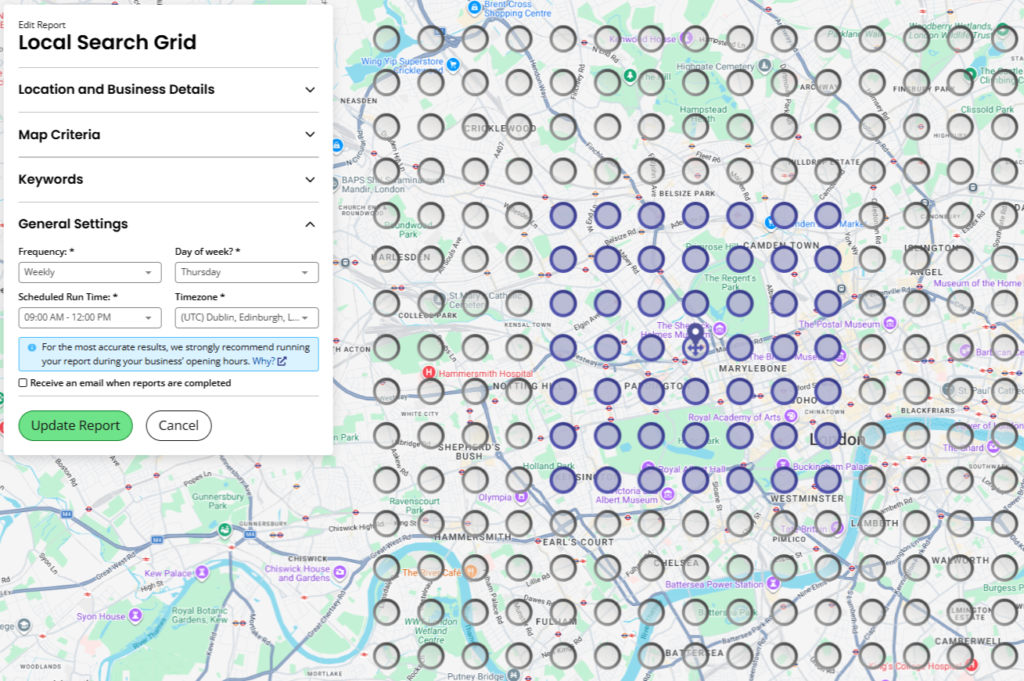
You can track your business (or client business) across the city and ZIP code – and you can add competitors into the mix to keep track of how their search positions are evolving. There’s more going on here than simply knowing ‘coffee shop Baton Rouge’ has gained two places.
Geo-grid rank trackers will:
- Highlight places you aren’t showing, so you can see where work is needed,
- Help you discover competitors so you can figure out how to outrank them and drive more foot traffic,
- And see exactly what you need to do to improve your visibility across the neighborhood with Maps views and AI Insights.
More than just tracking movements up or down, this local SEO automation saves time, pulls together actionable data, and highlights where opportunities for improvement exist.
You can see how AI is mentioning your business too, with tools like Local AI Visibility Tracker.
7. Let the data tell you what to do next, instead of digging through reports
Right at the outset, we mentioned that there was one specific task that you could leave to AI automation. Data analysis and prioritizing your actions is that task.
Every one of your local business search engine optimization tools creates data. That data contains invaluable decision-making insight if you can find a way to harvest, interpret, and translate the raw numbers into something more meaningful.
Entrust this to AI, and after the initial setup, data processing and interpretation will run on autopilot to give you a consistent flow of clear recommendations and points of action.
You can use a Model Context Protocol (MCP) to run this by connecting an AI tool like Claude or ChatGPT to a third-party data source. That can be complex if you aren’t a coder. We have our own local data API and local SEO MCP that let you question your data.
What an MCP doesn’t bring to the table, though, is the years of experience and knowledge.
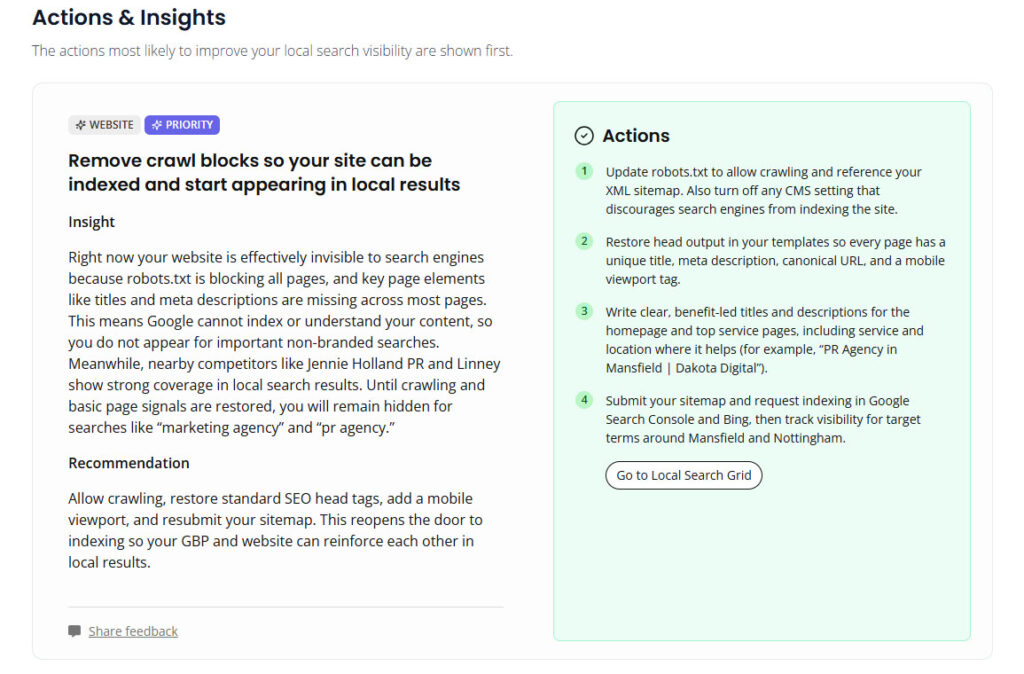
BrightLocal AI-powered insights and actions offer a simpler option that doesn’t call for any technical knowledge or years of expertise. It analyses your local SEO data, including rankings, citations, Google Business Profile, and review trends, and then auto-generates recommendations based on that information. It gives meaning to the information by pulling together each disparate data source into one cohesive, plain English summary with actions to prioritize, along with context as to why those steps matter.
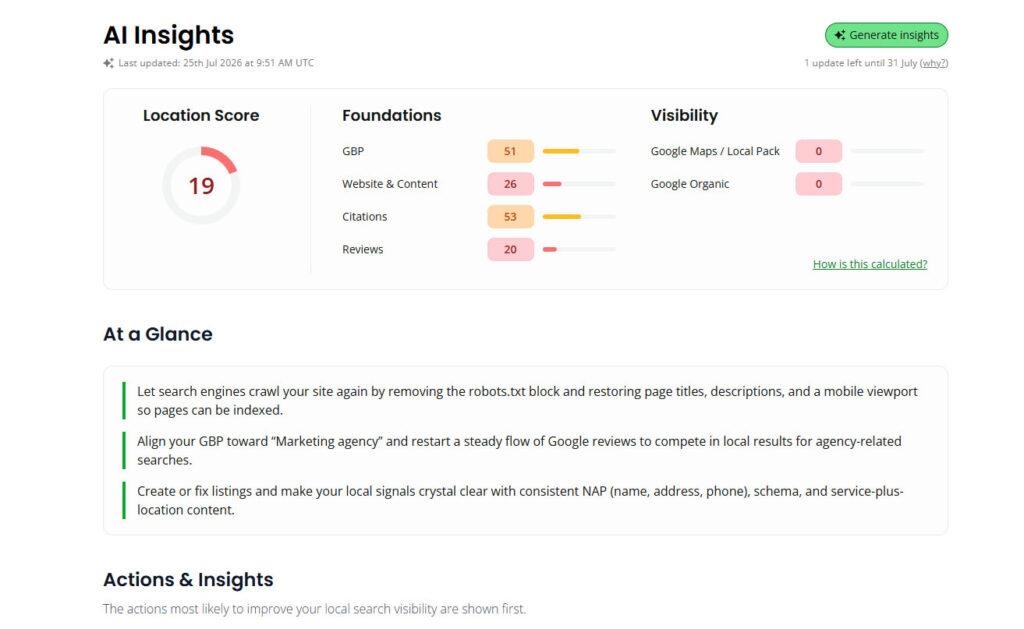
Once you’ve got your top level recommendations you can then break them down into the specific actions you need to take. Without having to crunch the numbers yourself. Many of the actions can be automated within the local SEO platform too.
The tasks that still need a human touch
For time-starved business owners and busy agencies, local SEO automation is a powerful tool that can make a meaningful difference to productivity, efficiency, and campaign progress.
If you’re wondering, ‘Can I do local SEO myself?’ the answer is yes – if you’re smart about where your time and effort are used. Entrusting a repetitive task such as local rank tracking to a tool just makes business sense. Likewise, outsourcing citation building to a professional is a smart use of resources if your time and talents are better directed elsewhere. Other repetitive tasks, such as pushing out an update to your business address or phone number, can and should be automated to save time and ensure accuracy.
There are elements of running a local search marketing campaign that still need a human touch, however. Local SEO automation isn’t a shortcut to top rankings and endless new reviews. It’s a strategy that allows you to cut down on manual repetition, but it doesn’t replace the human who’ll often be needed to make a judgment call.
Even with the above automations and tips, if you need help with managing your local SEO, then find out about our fully-managed Local SEO Services. These offer a combination of everything you’ve read about here, while you just concentrate on running your business.