







Most chats about AI stop at which tool to use, which prompt to write, or what tactic to automate. But when Mike Forgie, a local search and AI optimization expert based in New Jersey, sat down with our CEO and co-founder, Myles Anderson, the conversation went in a much more helpful direction.
- Who owns your data?
- Who owns your process?
- What happens to your business if the tool you rely on disappears overnight?
This story is part of our series on how local SEO pros are actually using AI day-to-day, and it follows our chats with Noah Learner at Sterling Sky and Dana DiTomaso at Kick Point. While Noah and Dana both focused heavily on reporting, Mike took things a step further by moving his whole agency workflow into Claude Code. Here is how it works, what it saved him, and a simple mistake he made early on that he hopes you can avoid.
Analysis always comes first, content second
When asked where AI has helped his work the most, Mike starts with a simple analysis.
“As much analysis as possible, and faster. Getting all the data from Google Analytics, Search Console, and Google Business Profile, going through BrightLocal’s data, aggregating it, and getting it explained to us in clear terms. Seeing correlations versus causations is pretty great.”
By bringing all performance data into one simple place, his team can quickly check performance, see if pages are bringing in real visitors, catch outdated content, and decide if a page needs new links or fresh case studies.
Content comes second, and Mike is very clear about that. He knows low-quality AI content is everywhere, but he believes that if you already know how to write well, AI can help you do it faster. The secret is just what you feed into it.
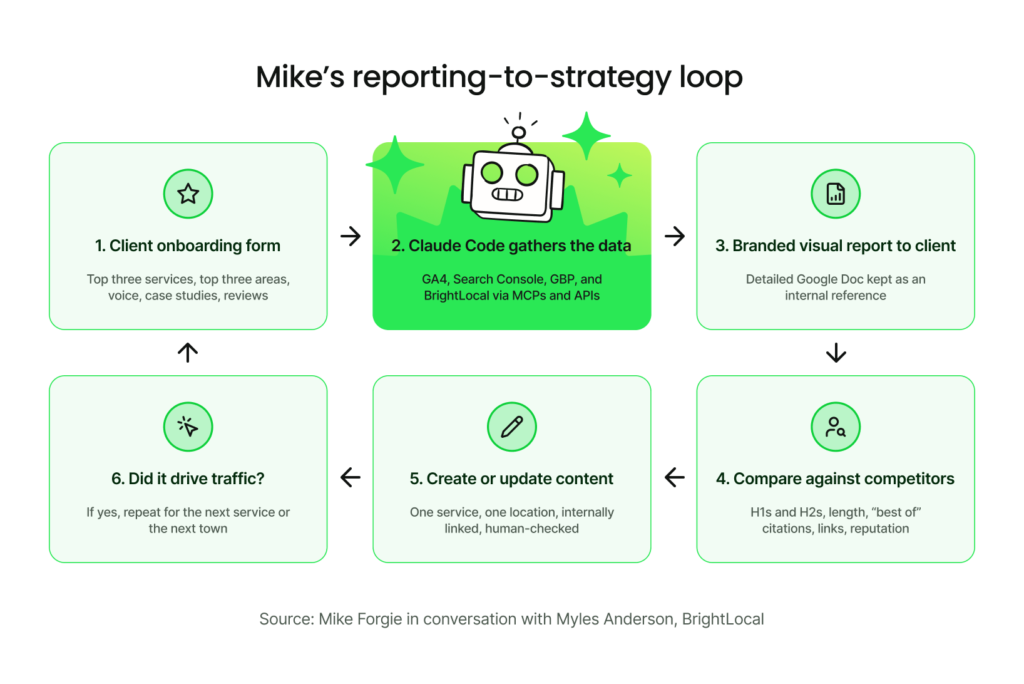
For every client, his team uses a simple onboarding form to gather details a generic AI tool wouldn’t know: the business’s natural voice, real case studies, local service areas, customer reviews, and past work. Mike uses an easy idea to explain why this matters.
“Information gain is a great way of putting it. If you’re adding new information and unique content, that’s what makes you citable. If you’re updating case studies, that’s all new information.”
Two simple questions on that onboarding form do most of the hard work:
- What are your top three services?
- What are your top three areas?
Service and location are the main building blocks, and that simple pair shapes both the analysis and the content plan.
Free resource: Local SEO client onboarding checklist
Everything lives in Markdown files to make it work on any AI platform
Mike’s agency runs on Claude Code rather than the basic Claude chat interface. He chose it because Claude Code uses plain text Markdown (.md) files, which are clean, simple, and easy to move around.
“We use Claude Code. Not the chat. If anything happens to Claude, we can switch to Gemini, we can switch to wherever we want. I think that’s really important. Make sure that you’re using the MD files and you’re not just relying on the platform. Make sure that you own these assets. If something happens to ChatGPT, something happens to Claude, you want to be able to pivot.”
As Myles points out, Markdown is basically a common language across AI tools. Once your client info, steps, and prompts are saved in this easy format, you aren’t stuck with just one provider.
Mike only learned a bit of code over the years to communicate with developers. He wants to emphasize that Claude Code isn’t just for devs.
“You don’t really need a real, actual coding background to use Claude Code. Claude creates the code. You’re not really messing with code. You get the rawest version of Claude, and you create that.”
He started with the command-line setup in VS Code and later moved his team to the friendly Claude Code desktop app, which he calls his team’s “biggest asset” because it is so easy for everyone to use.
He created a daily workflow that uses a reusable skill (a set of saved steps) that his team built for strategy and reporting. It automatically pulls data from connected MCP servers and APIs, and if a client cannot share direct login access, it uses a browser extension to open the site, grab the data, and bring it back safely.
Make visual and compelling reports clients actually want to read
Mike’s reporting setup is a great example of learning from what real clients actually read, rather than what you think they will read.
At first, he sent three things: a short email summary, a link to visual white-label local SEO reports in BrightLocal, and a long detailed summary in a Google Doc. The Doc was very thorough, but it turned out almost nobody was opening it.
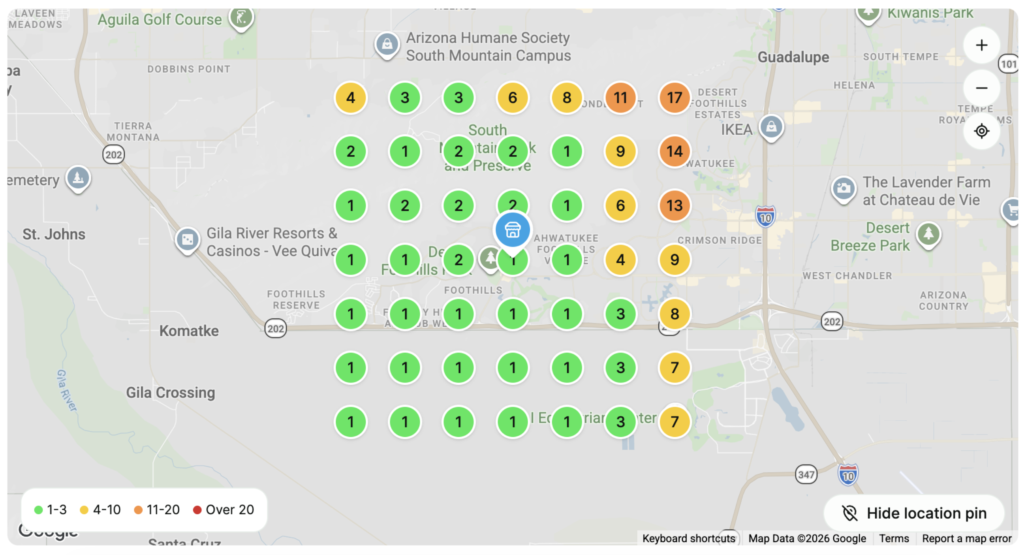
“We realized the clients were not reading these docs. You look at the BrightLocal stuff, they love those types of reports, those visual reports. Seeing dots and seeing red to green is the best. So we had Claude Code brand and visually do everything for us. We’re like, here’s our branding colors, this needs to be visually appealing for them, and it designed it for us very easily.”
The dots and the red-to-green Mike is describing are Local Search Grid reports, which plot where a business ranks at each point across the area it serves. They are the visuals his clients kept coming back to, so they became the model for how the team’s own branded reports should look.
The team still creates the Google Doc, but now it’s used as a quick internal reference sheet. Clients get the clear, branded visual report, while the team keeps the detailed notes for themselves.
The new reports were a kick off point for strategy
Every report works as a quick strategy check: was this page published? Did we link to it? Has traffic dropped? And when did we last update our real-life examples? Most importantly, did what we built bring in new visitors, and can we do it again for another service or city?
From there, the exact same document becomes a handy starting point to spot gaps against competitors.
“Based on this, we want to rank for this. What are you seeing between the competitors that rank there and the gap that we have? It’ll tell us the H1s and H2 section, the length of things, are you cited in sources, are you cited in a ‘best of’ type article. Links and reputation. Those are big ones.”
The biggest perk, Mike says, is saving time, and he is very honest about why that matters for a business.
“If you use a thousand bucks and it takes you an hour, you’re now a thousand an hour. If it takes you ten hours, you’re a hundred an hour.”
However, none of the AI output is copied directly. Mike and his team are search experts who review everything by hand first.
“AI will take a consensus of everything it knows. So if you just say ‘make me an SEO plan,’ it’s going to go out and try to pull a bunch of SEO plans, not knowing specifically what you need. And that’s a problem. Even if you think the AI is going to say ‘we know SEO,’ it doesn’t. It knows what it knows, gathered by the internet at that time of search. You really have to feed it.”
Part of guiding the AI involves setting a clear quarterly goal for each client. Deciding what main goal we want to achieve over the next three months? It also takes real-world knowledge that AI won’t know on its own—like knowing that adding 20 new pages might accidentally hurt a page that is already working well.
That know-how used to live in Mike’s head. Now it lives in a strategic skill too, so when he hired a new team member, they could learn how the agency thinks from day one instead of starting from a blank prompt.
Feed it the real problem, not a generic prompt
When asked what he wished he knew when starting out, Mike shared a wonderfully simple piece of advice.
“Don’t put your repository in Google Drive. I didn’t know what a repository was when I started, and everyone uses GitHub, and I was like, I don’t know what that is. So I just did it in Google Drive. It wasn’t working when I had to transfer it to my team. Learn how to properly set up a repository.”
The second lesson is about how he communicates with AI tools. Mike moved away from long, complex prompts and switched to giving plain context. “Sometimes prompts are BS,” he says. You still write short prompts, but the magic comes from the extra details you provide.
“I want to feed it as much as I can. I don’t want to prompt it with these little paragraphs. I want to be like: here’s all the data, here’s how we find it, this is my problem, this is the solution I need.”
He explains everything as a simple problem and solution because, to him, that’s all local search really is: “My water heater just exploded. I need an emergency plumber. What’s the solution? Whoever the emergency plumber is, that’s local, that’s being the best.”
In daily work, he simply speaks his thoughts out loud into a draft prompt, reads it over to make sure it makes sense, adds missing details, and asks the AI to ask him questions before starting. It feels less like a strict prompt and more like a friendly chat to build a draft brief together.
He is also open about how tricky the learning curve was. He had plenty of times where he asked the AI to do something three times, only to watch it fail. What helped him push through was switching to Claude because it felt more natural for writing, taking simple courses, and joining helpful communities of people solving the same challenges.
“Ask it to do stuff, hit those walls, break it, and then it can fix itself. It fixed a lot of things that I broke. You can’t be afraid to just go for it.”
What this means for your agency
Mike’s setup might sound a bit technical at first, but the core ideas are very simple and easy to start using today:
- Own your assets. Store your client info, steps, and prompts in standard plain-text files rather than losing them in a chat window. If your AI app goes away tomorrow, your work stays safe with you.
- Ask two simple questions. Find out every client’s top three services and top three locations. That quick grid gives you the exact blueprint for your research and content.
- Notice what clients actually read. Mike’s long text docs went unread, but visual summaries worked wonders. Make reports that fit how people naturally consume information.
- Focus on the problem, not fancy prompts. Share the background, data, current problem, and goal clearly. Then let the AI ask clarifying questions to help you out.
- Be the original source. In AI search results, pages with clear, specific, and helpful details get cited and clicked most often. Share real facts instead of basic templates to win local AI visibility.
- Keep a human expert in charge. Always have a real specialist check every recommendation. AI knows general web info, but you know your client’s real needs.