Location pages are essential for many multi-location businesses. With unique, useful content, these pages can rank in search engines, attract customers, and give AI-assisted search clearer information to work with.
The catch is the same one it’s always been: each page needs to earn its URL.
If a location page is mostly copied from another city page with the address swapped out, it can bloat the site with low-value, duplicate content.
Our guide walks through how to create location pages that are specific, helpful, easy to find, and ready for the way local search is changing.
What is a location page in local SEO?
Location pages are web pages that give detailed information about a particular business location in a specific city, county, or state. They help potential customers find the business’s nearest physical location and provide search engines with enough information to index and rank the page for “near me” and “city name + industry” keywords.
You may also hear location pages referred to as “local landing pages” or “location landing pages.” These are essentially the same thing.
Why bother with location pages?
Location pages are a worthwhile effort because they give valuable information to customers, which in turn adds value to your local SEO strategy. Without location pages, multi-location businesses can struggle to get found in search engines like Google.
If you want to create a location page that stands a chance to rank in SERPs and convert customers, you have to justify each new page with unique and valuable content. In other words, the amount of value on your location page has to merit its own URL.
Should this location page exist?
A location page should exist because it helps a real customer understand, trust, choose, contact, or visit that specific location. It should not exist only because there’s a city name you want to rank for. Ask:
Can we add information that only applies to this location?
Does this page help someone choose between this location and another nearby option?
Would this page still be useful if search engines didn’t exist?
Is there enough unique content here to justify a separate URL?
If the answer is no, the page may not need to exist yet.
You may need a better location finder, a stronger service area page, or clearer internal links instead. A thin location page can look like progress in a spreadsheet, but it usually creates more cleanup work later.
How to make location pages valuable
Value on a location page comes from information that applies only to that specific location. If you copy and paste content to another location page and it remains true, it’s not unique. Yes, it’s okay to include non-location-specific information (such as the brand mission statement or service descriptions), but let those be the exception rather than the rule.
Bottom line: Your location page should be largely comprised of information that applies only to that location.
Exactly how much content on the page should be unique?
Try to make more than half of the page content unique to that location. But, a margin of 40% to 60% should be a safe enough bet to justify the unique URL for the location and showcase its value to Google.
The short answer to this question is “as much as possible.” While that may not be the most helpful insight, it is more helpful than “it depends.” (Even though it does, in fact, depend.)
Why AI search raises the bar for location pages
AI search hasn’t changed the basic job of a location page. It has made weak pages harder to justify.
AI search doesn’t mean you need to rewrite your location pages for AI.
The fundamentals still do most of the work. Your pages need to be crawlable, useful, specific, and easy to understand. Search engines and AI-assisted results still need clear information about who you are, where you are, what you offer, and why this location is relevant to the person searching.
The best AI search preparation for location pages is not a new trick. It’s better content hygiene.
Make the page specific. Make the local details obvious. Keep the information consistent. Answer the customer’s real questions before they have to leave the page and search again.
Google’s AI search features still rely on search systems, indexed content, and pages that can be crawled and understood. For local businesses, that means your location pages need to make the basics obvious: where the location is, who it serves, what it offers, how people can contact it, and why this specific location is worth choosing.
This is where generic city-swap content starts to struggle. If every page says the same thing, search engines and AI tools have little location-specific information to work with.
A strong location page provides clear, consistent details that align with the rest of the business’s local footprint, including Google Business Profile information, citations, reviews, and structured data where appropriate.
So, yes, keep thinking about keywords. But don’t stop there. Build each location page as a clear source of truth for that location.
Location pages vs geo pages
There’s an important distinction between location and geo pages:
Location pages are tied to actual, brick-and-mortar locations, while geo pages are not. A location page is about a specific location; a geo page simply describes the services a business offers in that location.
Geo pages are used when a business wants customers from a specific region but doesn’t have an office there. Service area businesses can find it particularly tricky to rank locally when they don’t have a physical store or office. This makes properly crafted service area pages particularly important.
Ranking geo pages is difficult
Ranking geo pages is challenging because it’s difficult to prove that a business is relevant to an entire area if it doesn’t have a physical store/office there. Even if the business typically serves clients from far away (e.g., attorneys), this may still be difficult to show on a geo page that isn’t tied to an address, Google Business Profile, etc.
Geo pages can easily become doorway pages
Another concern with geo pages is that they can slide down the slippery “is this a doorway page?” slope.
What is a doorway page?
A doorway page is a type of spam that uses slight variations of a single page to rank for many variations of the same query. As you can probably tell, a few hundred pages sans actual locations and addresses targeting small cities in the same county could, ostensibly, fall into this category. Proceed with caution.
You can see what Google says about doorway pages here.
Locations under the same brand in close proximity to one another create a unique challenge. Not only are they providing the same or similar products and services to each other, but offering those services to the same pool of customers.
The truth is, some element of competition will always exist between these types of locations. That said, there is one way to help differentiate them: content with unique value.
In other words, you’ll want to provide as much information as possible about each location that applies only to that location. This is the goal of any location page, but it is especially important for ones in close proximity.
If two nearby locations sell the same thing to the same pool of customers, the page needs to show why someone would choose this location over the one ten minutes away.
That doesn’t mean forcing artificial differences where they don’t exist. It means adding the details customers actually use when they decide: who works there, what’s available, how easy it is to get there, what the reviews say, and what makes that location convenient or trustworthy.
Anything else you think is useful to the customer and truly unique to that location.
The more information you have about each location–its features, services, amenities, etc.–the easier it becomes to differentiate between them and create a unique set of pages that add value to customers and search engines alike.
One of the biggest and most common mistakes you can make when creating location pages is thinking your content is unique when it really isn’t. For many business types (plumbers, cleaning services, lawyers, chain restaurants, etc.), location pages risk being rewritten as home pages or service pages.
If you find yourself creating location pages with a unique address and phone number but with content that doesn’t really say anything new, it’s not really unique.
This type of content – I like to think of it as “diluted-value content” – is bad because it takes time to create but doesn’t give anything new or helpful to the humans and search engines you’re hoping to impress.
2. Making it hard for customers and search engines to find your location pages
For people to find your location page, Google or your search engine of choice needs to find, crawl, render, index, and rank it.
Google needs to be able to find your pages, so they should be included in both XML and HTML sitemaps. It’s also helpful to link to the page internally, as this makes it easier for Google to discover.
Unfortunately, internal links aren’t always easy to create for location pages. From an SEO standpoint, we tend to prioritize linking between topically related pages of content as we should. But if your page’s topic is a location, linking to it from another page can feel stilted or unnatural.
Here are a few tips for creating internal links to your location pages:
For businesses with just a few locations
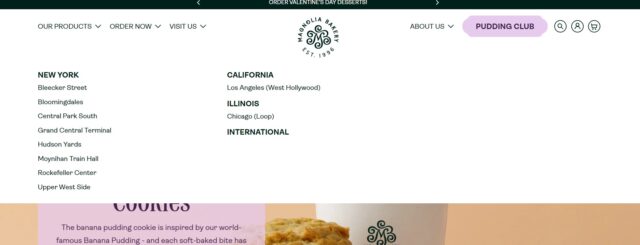
Create a “Locations” dropdown in your top nav and link to locations from it
If location pages are standalone and do not have their own service pages/child pages, link to the locations from the business’s service pages by mentioning the areas the business serves
If locations are nearby (or even within the same state), include links to the other locations via side navigation in the location page template
For businesses with many locations
The goal is to avoid creating location pages that are “orphaned” from the rest of the site (e.g., inaccessible via navigation from other pages). Not only does this make it harder for humans to find your content, but Google as well.
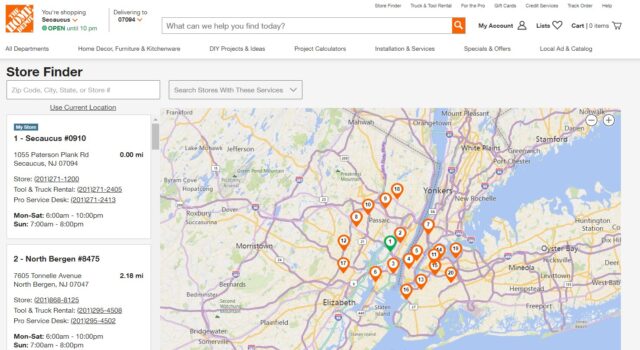
Use a location finder to make pages accessible to humans via search
Link the location finder in the top navigation of your home page (and throughout the site)
On each location page, add a module with “nearby locations” and link to other locations in the vicinity
Consider a separate XML sitemap for location pages. This allows you to easily check the indexation status of them in Google Search Console and ping the sitemap when new locations are added
The goal is to avoid creating location pages that are “orphaned” from the rest of the site (e.g. inaccessible via navigation from other pages). Not only does this make it harder for humans to find your content, but Google as well.
Search intent and why it matters for location pages
Search intent refers to what someone is looking for when they type a search into Google. At the most basic level, location page search intent can be broken down into two categories:
People looking for a service or product
People looking for the brand
AI-assisted search can expand a local query into more specific follow-up questions, but the customer’s intent remains at the center of the page.
Someone searching for a service or product needs to know whether this location can help them. Someone searching for the brand needs confirmation, trust signals, and a clear next step. The page structure should make those answers easy to find without forcing the customer to hunt for basic details.
Your location page should match the rest of your local footprint.
Make sure the core details on the page line up with that location’s Google Business Profile, local citations, review profiles, and any structured data you’re using. That includes the business name, address, phone number, opening hours, services, and other location-specific information customers rely on.
If the page says one thing and the rest of the web says another, you’re asking customers and search systems to sort out the mess for you.
Someone looking for a service, for example, might type “plumber in Seattle” into Google. If done right, your location page should rank for that query because it is relevant to the search intent–someone looking for a plumber in Seattle.
On the other hand, if someone were typing “ABC Plumbers Seattle” into Google, they would be looking for information about ABC Plumbers specifically. The search intent is different, and the content of your location page should reflect that–it should be focused on ABC Plumbers and how they are different from their competitors in Seattle.
In the grand scheme of search query intent, both of these are pretty close to the bottom of the conversion funnel. Someone looking for “how to unclog a drain without calling a plumber,” for example, probably won’t land on a location page because the query is more easily satisfied by a video or how-to article.
So, it’s pretty safe to assume that location pages are almost always targeting bottom-of-funnel searches.
Search intent and page structure
By understanding the search intent of location pages, you can create content that speaks to what your potential customers are looking for and then prioritize the right content on the page.
Branded searches benefit from “conversion”- focused content such as unique selling propositions, coupons, or information that distinguishes the brand from competitors. If the majority of your location page content is branded, it may be wise to structure your page to prioritize conversion-oriented content items.
Searches like “plumbers in Seattle” should focus on informational content, such as where the business is located and what products and services it offers. If your page attracts more clicks from these types of queries, be sure to structure it accordingly.
What a Strong Location Page Usually Includes
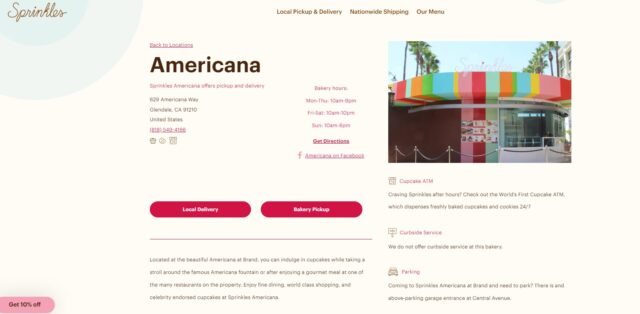
A strong location page gives customers the information they need without making them dig for it.
That usually includes:
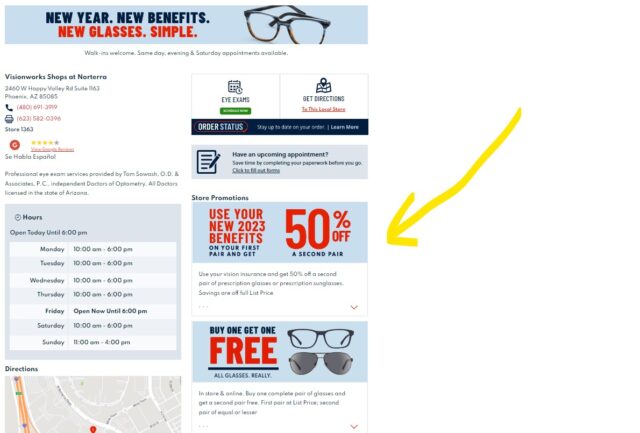
The location’s name, address, and phone number
Opening hours
Location-specific services, products, or inventory
Local reviews or testimonials
Staff bios or team details, where relevant
Directions, nearby landmarks, parking, or public transit
Accessibility details
Photos of the location
Internal links to nearby locations or related service pages
A clear next step, such as calling, booking, getting directions, or checking availability
Not every location page needs every item on that list. A small clinic, a retail store, a dealership, and a restaurant all need different details.
Can someone land on this page and decide what to do next without opening three more tabs?
Creating location pages isn’t difficult. Building pages that genuinely help people is harder, let alone ones that can rank in search engines and support AI-assisted discovery.
Well-crafted location pages give customers the information they need and give search systems cleaner signals to work with. That starts with the right priorities:
Make the most of each location page, making it unique and location-specific. Aim for 50% unique-value content.
Treat each location page as a clear source of truth for that location.
Geo pages are harder to rank than location pages and can easily be mistaken for doorway pages.
Unique-value content is especially important on pages competing with nearby locations of the same brand.
Saying the same thing with different words doesn’t make the content more valuable. It’s still duplicated in practice.
Make sure people and search engines can find your location pages through sitemaps and internal links.
Structure the page around the search intent behind your most important queries.
Use the checklist above as a QA pass before publishing or refreshing a location page.