

How to Manage Your Business Opening Hours on Google Business Profile
Last updated on October 10th, 2025
Imagine the scenario.
You’re a dog owner and your good boy needs treatos. You check the pet store’s Google Business Profile (formerly known as Google My Business) listing, which says it’s open. You drive across town for treats, but find that the pet store is CLOSED.

Now imagine you’re the pet store owner. You just made a dog sad. What’s more, you made a pet owner angry. They just wrote you a one-star review on Google, and you might have even just lost their ongoing custom.
Something as seemingly simple as store opening times can have less-than-simple consequences for both customers and business owners—so it’s imperative to keep your opening hours updated and correct!
What are ‘opening hours’?
Opening hours are defined by Google as:
“Your regular customer-facing hours of operation. These are times when a customer or potential customer can visit your location in person.”
While there can be minor variations depending on business type, generally opening hours are when a customer can make real contact with someone from the business.
So, for a bakery, that would be the moment they open their doors and start answering the phone to the moment they flip the sign to “closed”.
On the other hand, for a service-area business like a plumber, the opening hours would be the times you would expect someone to answer the phone.
Note: Don’t try to find loopholes here. Just because technically you could answer the phone for your business at 11pm doesn’t mean it counts as being open. The plumber might use his personal number to contact customers, but unless he’s ready and willing to go and fix a leak at that time all the time, then it’s not an opening hour.
With changes in December 2023 causing openness to be a ranking factor, it may be tempting to seize the “opportunity”—but falsifying your opening hours does more harm than good!
Google recommends that certain business types shouldn’t provide opening hours information—such as those with varied hours or that operate by appointment only.
Read more here about Google’s guidelines for indoor lodging, schools and universities, cinemas, transportation, event venues, and natural features.
Where do opening times show?
Your Google business hours will show in your GBP listing on the search engine results page (SERP):
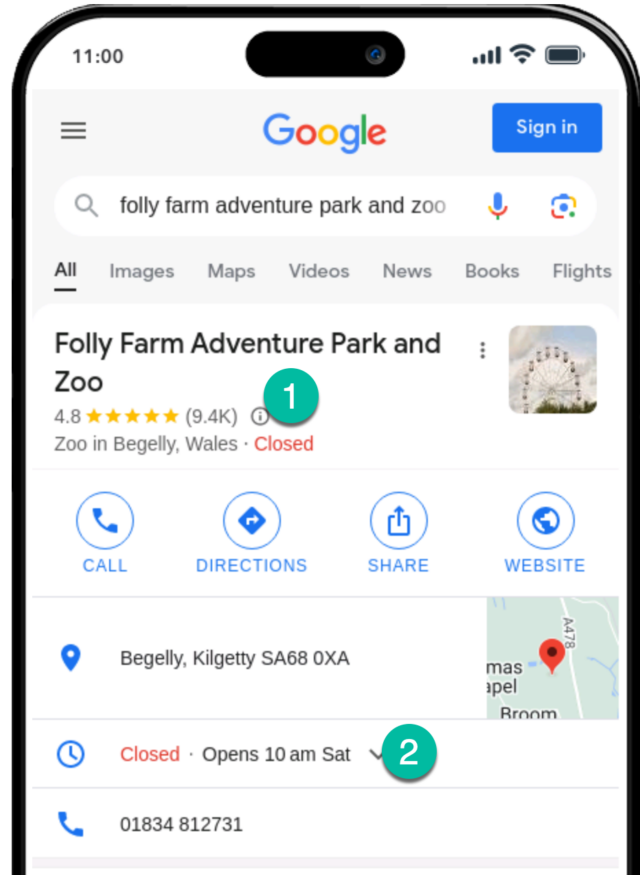
Your Google business hours at the time of search will affect whether your business is marked open or closed (see 1 in the image above). There’s also a dedicated section for your regular opening hours (see 2 in the image above).
Users can click on ‘more hours’ (if the business has multiple types of hours set), or the small arrow (if the business only has regular hours set) to see the full details of week-long opening hours for a business:

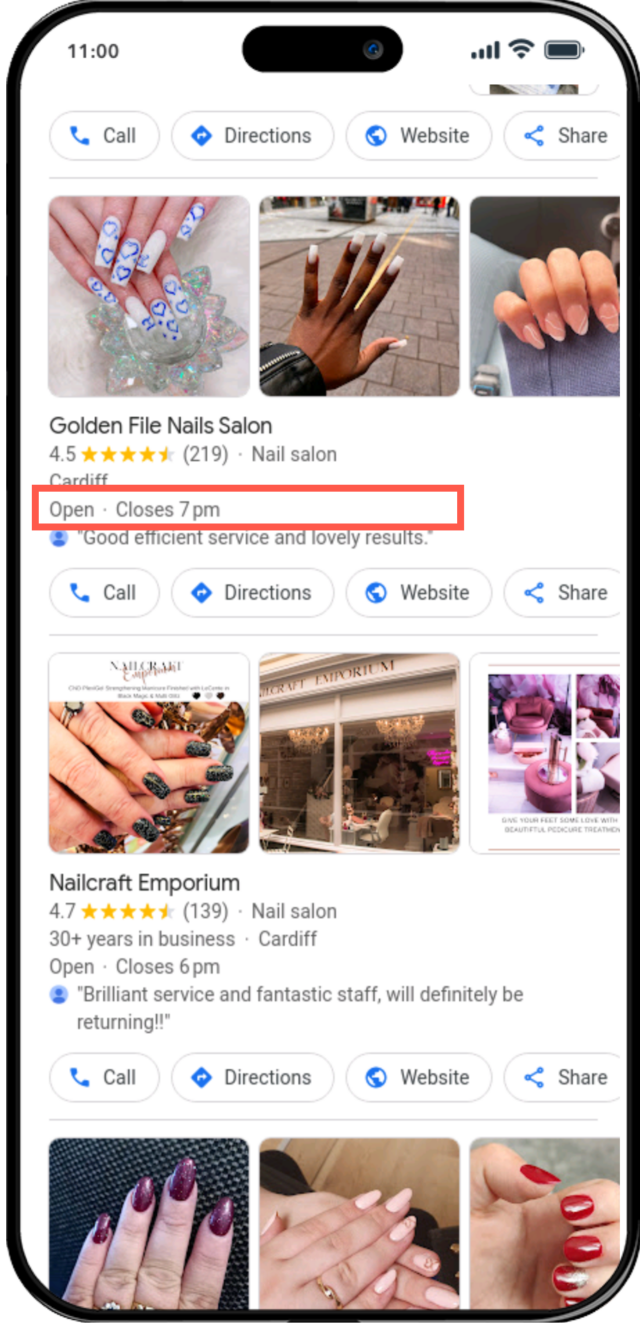
In the Google Local Finder and Google Maps, businesses can show as open or closed, and the hours of operation for that day will also show.
Opening times in the Local Finder:
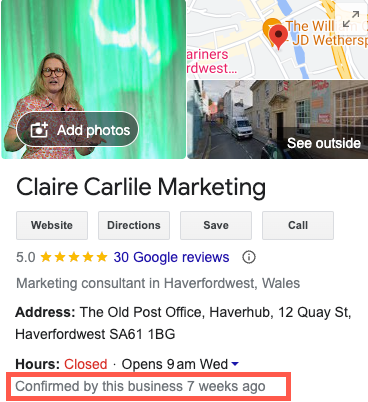
When you’ve updated your business hours, or if you have ‘confirmed’ your business hours, Google will often flag this in the Business Profile.
I imagine this sends a ‘trust signal’ to customers and potential customers that the business is engaged in making sure that the details are correct:
How to Change Business Hours on Google
How you add and update your business hours will mostly depend on how you are managing your business profile in general.
Via the in-SERP editing experience
If you are a small business with a single location or a couple of locations, you’ll likely use the in-SERP editing experience.
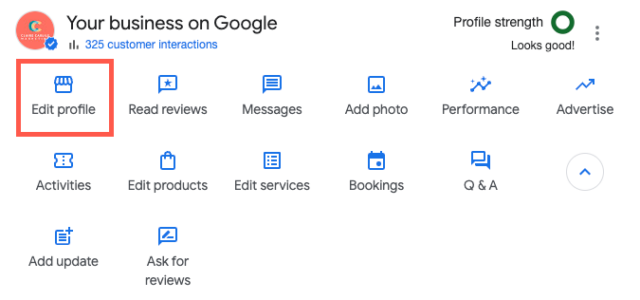
As you likely already know, to do this you simply search for your business name in Google Search and then click ‘Edit profile’. You can also go to business.google.com to get to this point.
Next, click on the row titled ‘hours’ to see Monday to Sunday. Here you can add your regular opening hours accordingly.
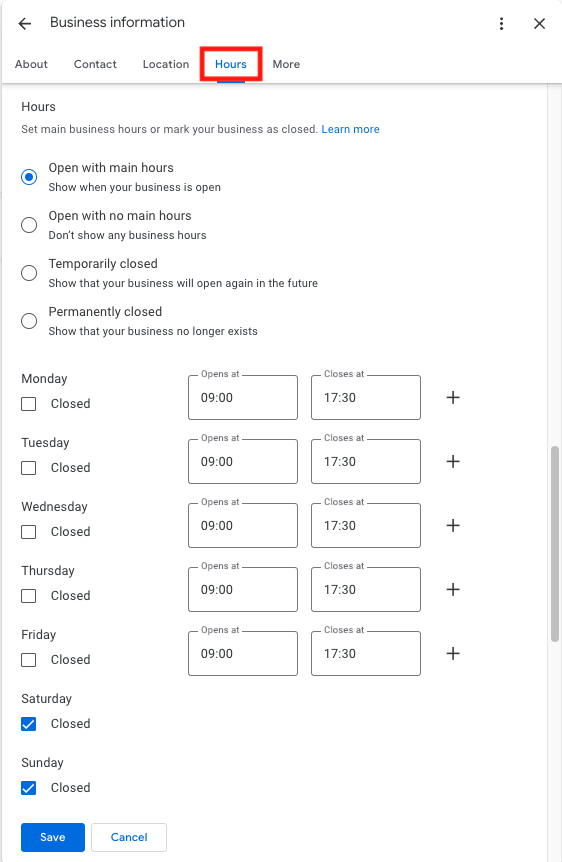
If you operate on a ‘split hours’ basis—for example, if your business closes for lunch and/or dinner and then reopens—then you can add multiple entries for each day. In this case, click on the little plus sign next to the day(s) in question and add your second or third set of hours.
Via bulk upload
If you’re managing a group of locations, you can update your business hours via bulk upload (more details here).
Note that it’s not possible to add ‘more hours’ via bulk upload or via third-party tools.
Via third-party tools
If you’re using a third-party tool that syncs with the Google Business Profile API, you should be able to update your hours on the platform.
Keep Your Details Consistent Across the Web
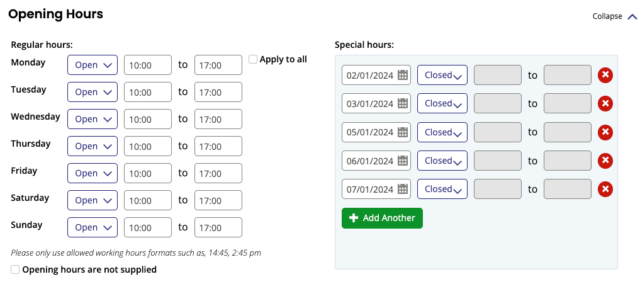
BrightLocal’s Active Sync allows you to set opening hours and special hours as part of your ‘core information’:
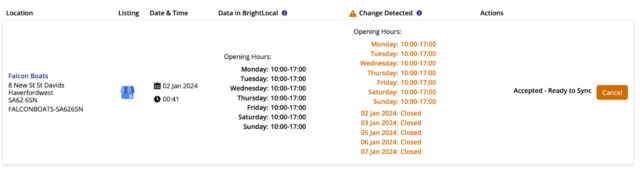
Active Sync will also alert you when and if your hours are changed by Google as a result of a user or a third-party listing:
Special Hours/Holiday Hours
Special hours allow businesses to mark specific dates—such as public holidays or special events—with an opening schedule that is different from the regular opening hours.
You can only add special opening hours once you’ve set your regular hours. Also, you should only use the special hours function to close your business for up to six consecutive days.
If you need to close your business for seven days or more in a row, you’ll need to mark your business as temporarily closed.
Where do Google business special hours show?
Your special hours will populate your opening hours according to the dates you’ve set. These will show directly in the Local Pack, Local Finder, Google Maps, and Business Profile.
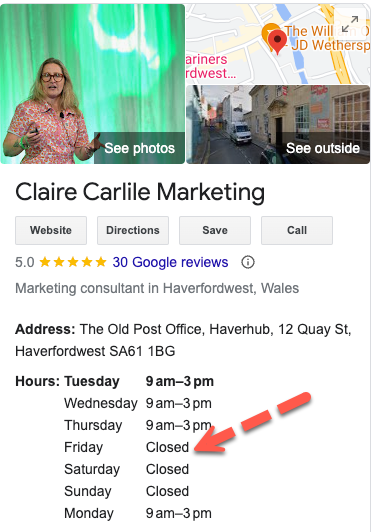
In the example below, ‘special hours’ is used to mark a specific day the following week when the business was due to be closed:
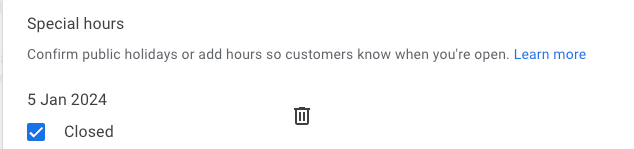
When the week that includes the date in question is reached, the business is shown as ‘closed’ on the relevant date:
Adding and Updating Your Google Business ‘Special Hours’/’Holiday Hours’
To edit your special hours/holiday hours, begin by searching for your business name in Google Search and then clicking ‘Edit profile’. This can also be done by going to business.google.com.
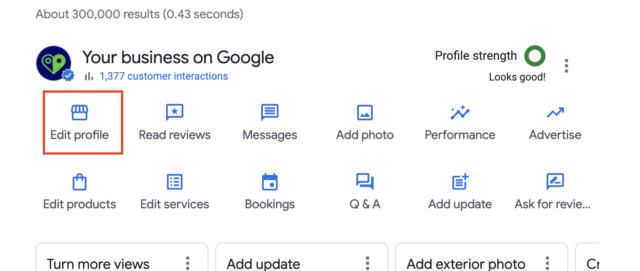
Click on the ‘hours’ tab and then go ahead and find your ‘holiday opening hours’:
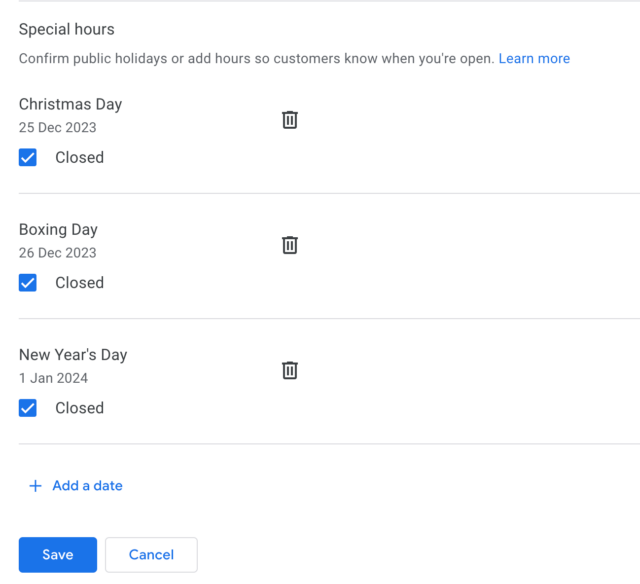
To change these hours, click on this section. You can then edit your existing dates or click ‘add a date’ at the bottom. You then simply select the dates from the calendar, and add the open and close times for those dates.
Google has a list of holidays by region and will often prompt businesses via notifications to check and update their holiday hours.
More Hours
‘More hours’ gives a business a chance to add a subset of hours for specific services.
“Generally, you should set ‘more hours’ as a subset of your primary hours”, but I’ve seen businesses adding additional hours for things such as ‘online operating hours’ outside of their regular opening hours.”
These are the options for ‘more hours’:
- Access
- Breakfast
- Brunch
- Delivery
- Dinner
- Drive-through
- Happy hour
- Hours for the elderly
- Kitchen
- Lunch
- Online operating hours
- Pick up
- Takeaway
Adding and Updating ‘More Hours’
To add ‘more hours’, navigate to the ‘hours’ section in the direct edit interface. Select the type of hours that you want to add by clicking the relevant button:

You’ll then be able to add the hours relevant to that service. You can add as many ‘more hours’ types as are relevant to your business.
Where do ‘more hours’ show?
Once you’ve gone ahead and added ‘more hours’, a prompt to view them will show next to your regular hours:
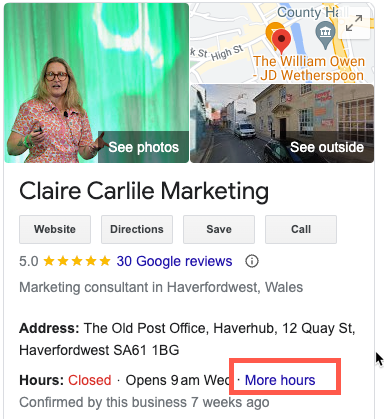
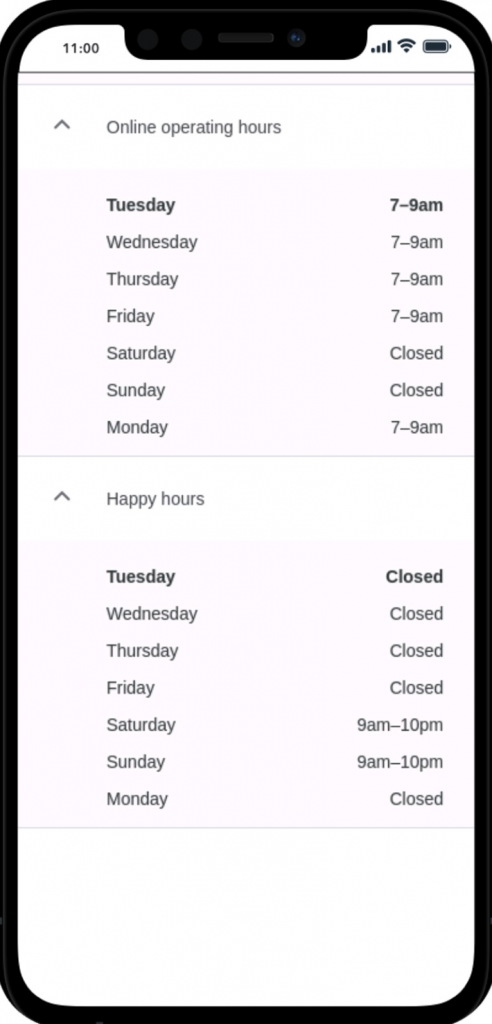
Note: It’s important to remember that using any of the ‘more hours’ categories outside of your regular operating hours won’t affect your business opening time in the SERP, which draws purely from your regular opening hours.
For example, if you state that you offer ‘online operating hours’ of 7 am to 9 am, but your regular operating hours are 9 am to 3 pm, if someone checks your business listing at 2:45 pm, they’ll see you marked as ‘Closes soon’ and due to open at 9 am:

Like ‘special hours’, ‘more hours’ won’t show unless you have set regular opening hours.
How do I temporarily close my business?
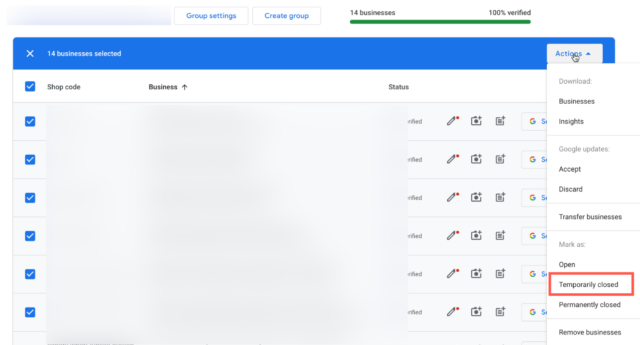
If you’re going to be closed for more than six days, then you’ll need to mark your business as ‘temporarily closed’.
Via the In SERP editing experience
Simply search your business name, click ‘Edit profile’, select ‘Hours’, and then choose ‘temporarily closed’:

Via bulk edit
If you are managing multiple businesses, you can mark some or all of them temporarily closed by navigating to the location group at business.google.com, selecting those businesses that you’d like to change, and then applying ‘temporarily closed’ via the ‘actions’ menu.
What does ‘temporarily closed’ look like?
The Business Profile of a business that’s temporarily closed looks like this:

In the Map Pack, it looks like this:

What if my business is ‘appointment only’?
If your business premise is open by appointment only, Google doesn’t have a specific option for this.
In these guidelines, Google suggests that appointment-only businesses shouldn’t provide hours on their GBP.
You can mark this within the direct edit interface via the ‘Business information’ section:

When you do this, opening hours will stop showing on your GBP listing.

Help—someone keeps changing my business hours!
Like many elements of a Google Business Profile, opening hours are subject to third-party edits:
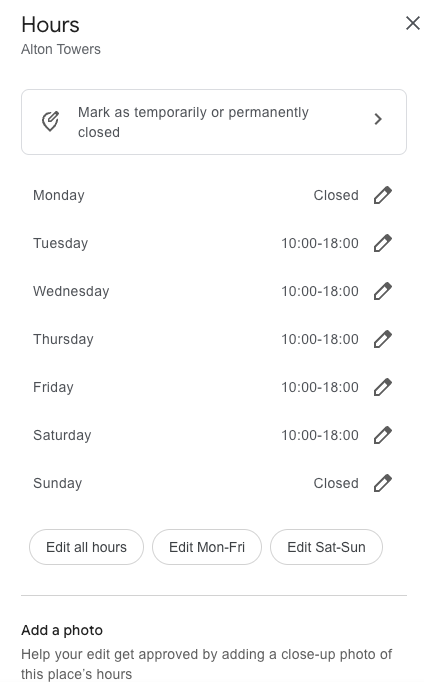
If your business hours are changing—and if it’s not you making the changes—it’s possible that a Google user is making edits to your business hours.
It’s also possible that Google is pulling data from a third-party website—so check your business listings in places like Yelp and Facebook to see if incorrect opening times are being scraped from those sources.
If Google accepts any third-party edits, then—if you’ve signed up for notifications—you’ll get an email from Google saying that your opening times have changed based on those edits:

If you need to go in and update your hours, you can do so via the direct edit experience. Google will warn you that it can take several to check and publish your edits, so make sure you make any changes ASAP!
The ‘Open Now Near Me’ Opportunity
It doesn’t take a genius to work out that having incorrect opening times advertised online is bad news. This can easily affect a business’s chances of attracting, converting, and keeping customers.
But it makes sense to wonder: is there a business argument to be made for making your opening hours as long as possible?
Search volume for phrases that include ‘open now near me’ has grown steadily since 2013:
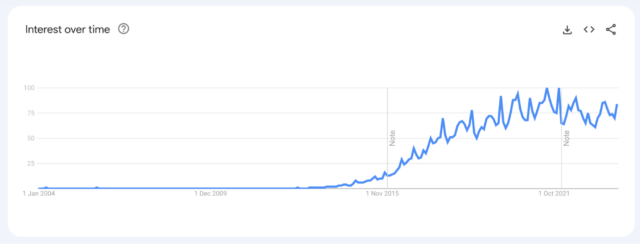
In our age of serious smartphone usage, we’re pretty used to instant gratification and impulse purchases. ‘Open now near me’ searches are on the rise for a variety of user needs:
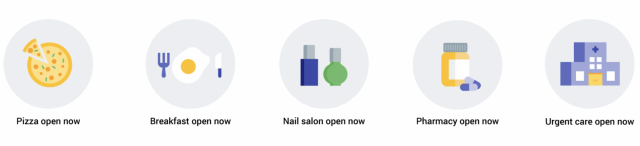
Tip: Make sure that you understand the ‘open now near me’ opportunity in your specific niche and vertical.
After all, global search interest in ‘open near me now’ remains consistent:
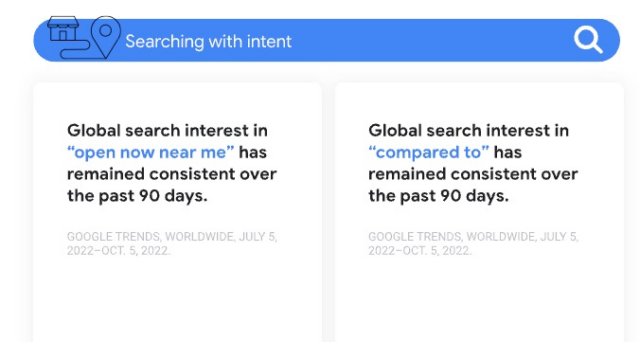
Are opening hours a ranking factor?
In fact, at the end of 2023, Local SEOs reported that they were seeing a rankings boost for businesses that were open at the time of the search being made.
Google confirmed that “openness” is a local ranking factor, and many businesses were tempted (or more than tempted, they went ahead) to set their hours as open 24/7.
All that being said, we do not advise changing your business’s opening hours to anything other than what is true and accurate.
Marking your business open when you’re not is not likely to endear you to your customers and potential customers (as per our doggo example above). The Google algorithm will likely settle down in terms of the effect of ‘openness’ to better reflect its true importance to a consumer according to search terms, verticals, geographies, and world events.
Using Local Search Grid to conduct a measured study and analyze the relationship between "openness" and local rankings for 50 business locations.
The ‘hours’ filter (on desktop) and the ‘open now’ button (on mobile) both reflect the ‘open now’ search trend:
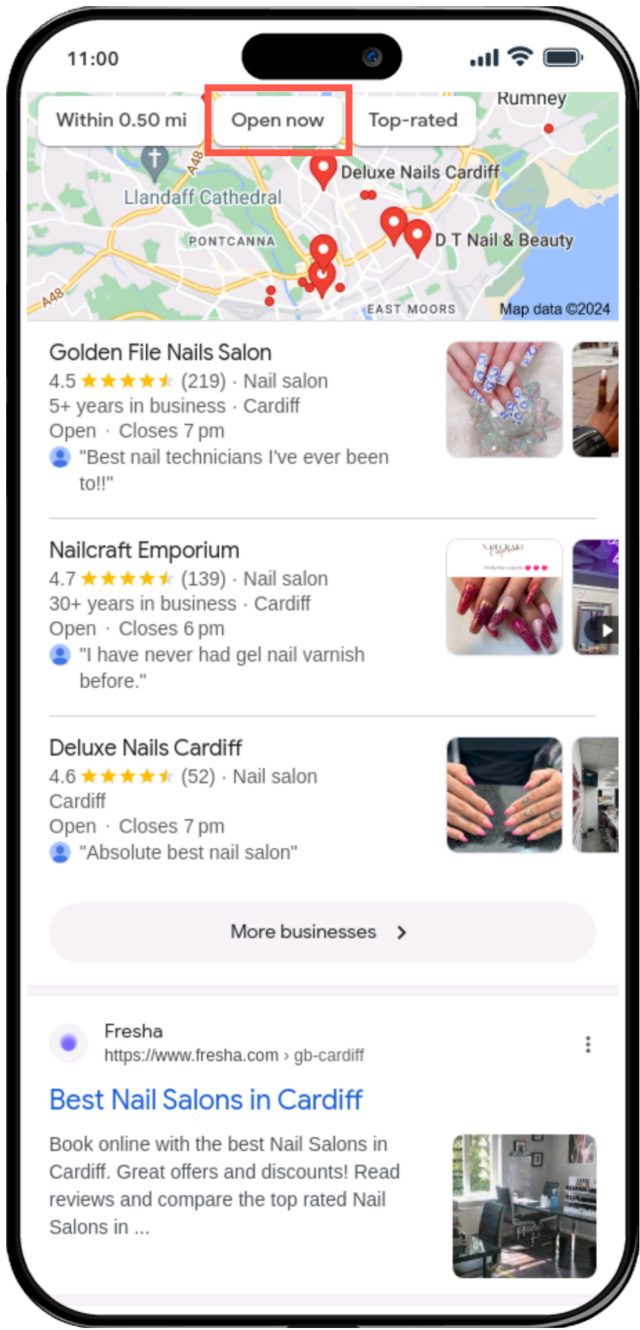
Here, Google gives users the ability to filter search results according to opening times, and this is another reason why a business must make sure the listed business hours are correct.
In Summary
So there we have it. If you weren’t already aware of the importance of keeping your hours correct and up-to-date, then you are now.
As you can see, hours are pretty easily updated via the in-SERP editing experience, via bulk upload, or via a third-party tool. Keep your hours showing correctly, keep in mind the ‘near me now’ propensity of searchers, and go forth and prosper.


