






Google reviews are one of the most important factors influencing whether new customers choose your business or a competitor’s. They affect how your business ranks on Google Search and Google Maps, and directly impact trust and consumer choices.
Strong Google reviews for businesses can attract more clicks, calls, and visits to a business. But a lack of reviews or reviews without responses can have the opposite effect:
- 83% of consumers read reviews on Google
- 55% of shoppers won’t use a business with fewer than 4 stars
- Review signals account for 16% of local SEO ranking factors
In this guide, we’ll explore why Google reviews matter, Google review features, how to manage and get more Google reviews for businesses, and other frequently asked questions.
Whether you want to improve your search ranking, increase customer confidence, or simply get more reviews, understanding Google reviews will give you a lasting advantage.
What Exactly Are Google Reviews
Google reviews are public comments and star ratings written by Google users about a business.
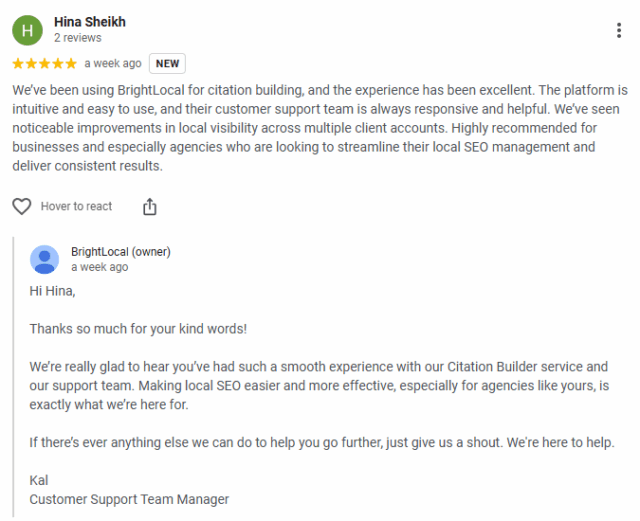
They appear on your Google Business Profile (GBP), a business listing that shows up in local Google search results and on Google Maps when someone searches for your business or the service you provide. Your GBP also has other features, including contact details, posts, photos, Q&As, and booking links. You can find out more about Google Business Profile here.
Anyone with a Google account can write a review. In most cases, reviewers are genuine customers sharing their experiences, but they don’t necessarily have to be. Reviews can also come from Google Local Guides, an active community of super reviewers who contribute reviews, photos, and updates to help improve Google business results.
Each review will feature the name and profile photo of the person who wrote it, which helps potential customers assess the legitimacy of each recommendation.
Key features of Google reviews:
- Star rating: 1-5 stars per review, plus an overall star rating for your business based on all reviews. Reviewers may also be asked to give additional star ratings on specifics like food, service, or atmosphere.
- Text: Written feedback sharing details of the reviewer’s experience. It’s not compulsory to write anything on a Google review.
- Photos and videos: Visual content added to a review by the reviewer. The business owner doesn’t have any control over which photos appear and in what order, but can report these if they break Google’s media guidelines.
- Additional questions: Reviewers may be asked to answer extra questions with pre-selected answers, e.g., “How much did you spend per person?” or “Did you dine in, take away, or get delivery?” This information can be shown in reviews.
- Review keyword filters: Search reviews by top keywords to quickly read reviews matching common themes, helping you spot trends or issues.
- Sort by: Order reviews by Most Relevant, Newest, Highest, and Lowest.
- User information: Shows the reviewer’s name, profile photo, Local Guide status, and number of reviews and photos posted to Google.
- Report review button: Flag reviews that violate Google’s policies directly from the review by clicking the three dots. Business owners can also report fake reviews from their ‘Manage your Google Business Profile’ section.
- Reactions: Users can react to reviews with one of five emojis: ❤️🙏🔥😝🤯
Once posted, the business owner has the option to respond to this feedback. Doing so is a fantastic way to demonstrate that you’re engaged with your audience and that their feedback is valued.
Where do you see Google reviews for businesses?
Google reviews are displayed wherever your business listing appears, helping searchers evaluate your reputation at a glance. They show up in multiple places, including the Local Pack, the Knowledge Panel, and on Google Maps. Google reviews for businesses are also used for specific searches using review justifications. Let’s dive into these.
The Local Pack
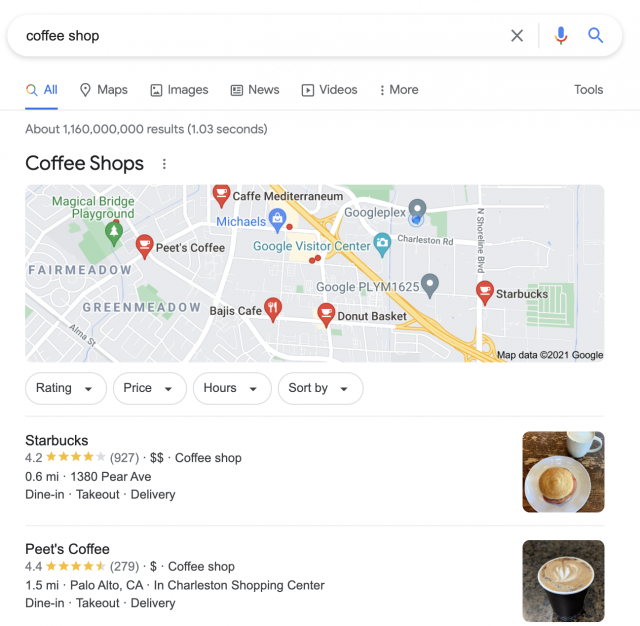
When a user searches for a local business service (rather than a specific business) in Google, they’ll usually be presented with the best three results at the top of the page. These three results are separate from the additional organic listings, and this section is known as the Local Pack. There may also be paid-for listings in this section with a ‘Sponsored’ heading.
Within the Local Pack, the average star rating from reviews and the number of reviews will be shown within the listing. Click on a business to open their Google Business Profile, and head to the reviews tab to read reviews in-depth.
You can also click ‘More Businesses’ to see additional local businesses to choose from.
The Knowledge Panel
The Google Knowledge Panel is the information box that appears on the right side of search results when someone looks up a specific business by name.
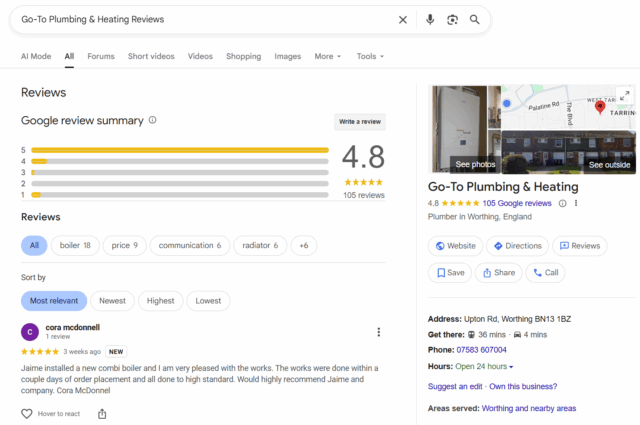
The Knowledge Panel highlights key details like the address, phone number, opening hours, and website. Google reviews are featured prominently here, showing the overall star rating and snippets of customer feedback.
In some cases, review star ratings from other sources can be shown here too. This makes it easy for potential customers to quickly assess your reputation without leaving the search page. Having strong, positive reviews in your Knowledge Panel can significantly influence decisions and encourage users to engage with your business.
Google Maps
When a user is searching for local businesses in Google Maps, the overall star rating and number of reviews are shown. Often, snippets of reviews relating to the search term are also highlighted and shown.
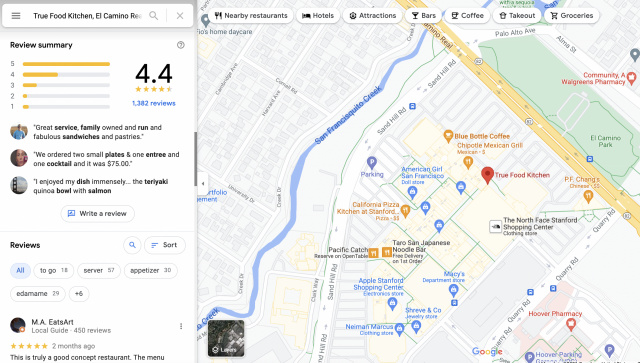
When a user makes a search for a specific business within Google Maps, they’ll be presented with comprehensive information from the GBP listing to the left of the map.
Users can scroll down through this area or click the ‘Reviews’ tab to find the review summary with an overall star rating and number of reviews, followed by snippets from reviews. These reviews can be filtered by keywords or sorted according to relevance, recency, and rating. Keep scrolling to read the full reviews.
Review Justifications
When a searcher provides specific intent for a local search, such as ‘vegetarian cafe’, then Google will take information from reviews to provide the most relevant results.
As you can see in the image below, part of the search term appears in bold where mentioned; these results are known as review justifications.
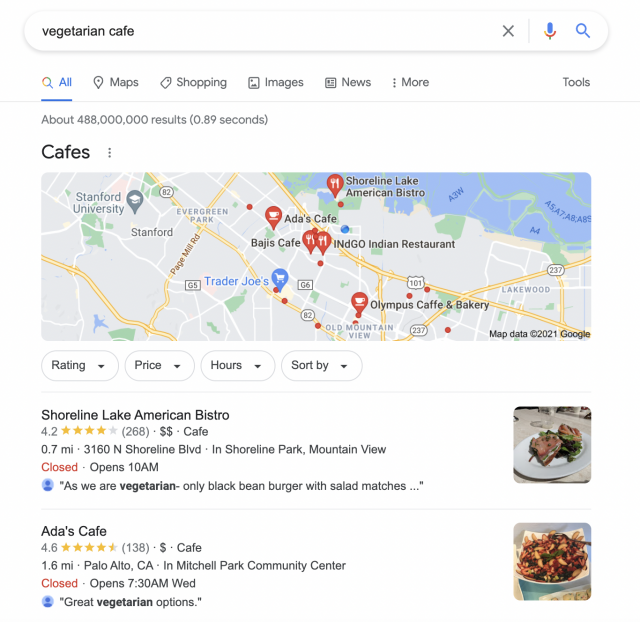
Encouraging your customers to use specific keywords when leaving reviews can help you improve your search visibility for relevant terms.
Why are Google reviews important?
Google reviews are an important tool for building trust with potential customers and standing out from competitors. Negative reviews can quickly erode confidence, with 63% of consumers losing trust after seeing negative feedback. Positive reviews help customers feel confident choosing you, even if they have not heard of your brand before.
Online reviews act as digital word-of-mouth, with 42% of people trusting reviews as much as recommendations from friends or family. Factors like star ratings, review volume, detail, and recency all influence shopper confidence.
Beyond influencing customers, Google reviews are also a local SEO ranking factor. A steady stream of positive reviews can help your business appear higher in local search results, making them an essential part of your local SEO strategy.
Maintaining a strong review profile involves delivering excellent service, providing high-quality products, and responding to every review to show that you value customer feedback. To learn more about the broader impact of customer reviews, see the benefits of online reviews.
Are Google reviews important to AI?
Recently, online reviews have become important in another way: AI.
AI tools, also known as large language models (LLMs), use online reviews to guide answers on local business searches. The latest Local Search Ranking Factors survey named high Google star ratings as the 8th most important AI search visibility factor.
At the time of writing, ChatGPT doesn’t surface Google reviews as a source, preferring to cite other business listings and local websites for recommendations. However, Google’s own AI models do use information from Google Business Profiles, including reviews.
Google is unlikely to want its new AI competitors to scrape and summarize Google reviews, but it’s entirely plausible that Google reviews will become more important for AI search visibility over the next few years. Focusing on building genuine, high-quality Google reviews will help your business be ready as AI search evolves.
How to Write a Google Review
To write a Google business review, a customer must first find the Google Business Profile of the business they want to review. This may be by searching for the business, or you may receive a text or email from the business asking for a review.
You need a Google account to leave a Google review, so log in or create an account if you don’t already have one. Then, click Write a Review on the business listing to start writing a review.
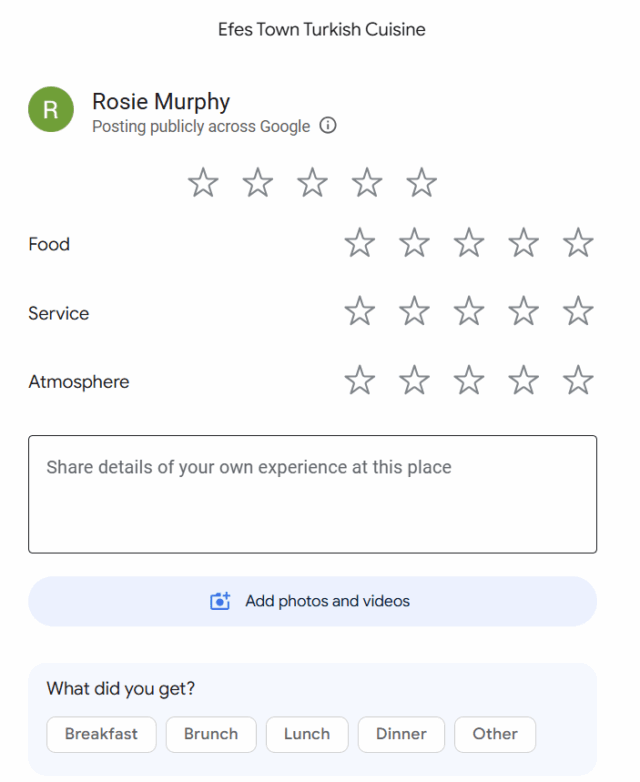
Choose a star rating from one to five, with five being the highest. Then write about your experience with the business. The more detail you include, the more helpful your review will be to other customers. You can also upload photos or videos to support your feedback.
You may be asked a few additional questions about your experience, though these are optional. Click ‘Post’ to submit your review, and it will appear on the Google Business Profile shortly.
How to Add Your Business to Google
If you don’t have a Google Business Profile for your business, then you’ll need to create one before you can start collecting reviews. Read our step-by-step guide to setting up a GBP listing to get started.
Once your listing is set up, you should spend some time optimizing it before you move on to thinking about reviews. For full details on how to optimize your profile, see our Google Business Profile optimization guide.
How to Manage Google Reviews
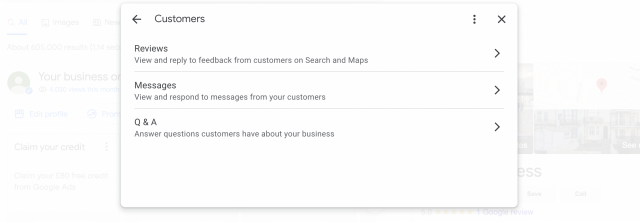
If you manage a single Google Business Profile, you can now update your profile and handle reviews directly within Google Search and Google Maps.
Simply type the name of your business into the search bar, and you’ll bring up the GBP control panel. Navigate to the ‘Customers’ section, where you’ll find ‘Reviews’. Here you can view and reply to customer feedback:
How to Manage Google Reviews With BrightLocal
BrightLocal’s Reputation Manager makes it easy to stay on top of your Google reviews alongside feedback from dozens of other sites, all within one simple dashboard. You can view every review in one place, track new feedback with email alerts, and reply directly to customers without switching between platforms.
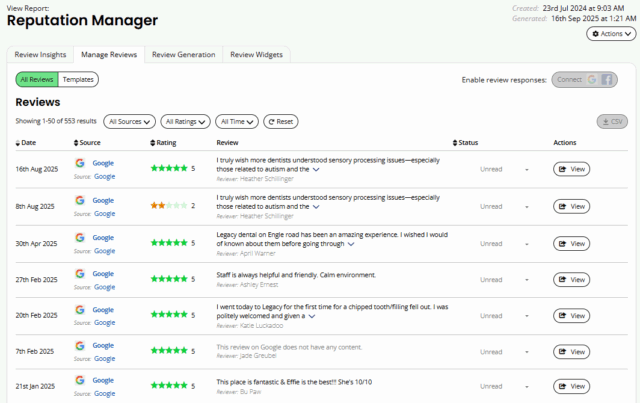
Reputation Manager also helps you get more Google reviews by sending email and SMS review requests to your customers, helping you build a stronger online reputation and improve local visibility.
How to Reply to Google Reviews
Responding to your customer feedback on Google is essential for building and maintaining an amazing reputation. 93% of consumers expect business owners to respond to reviews, with 81% wanting a response within a week. This expectation means that responding to reviews has become a normal aspect of good customer service.
You’ll be notified by Google whenever a customer leaves a new review, making monitoring simple if you manage a single business or a modest number of reviews.
For higher volumes, staying on top can be more challenging. Review management software like BrightLocal’s Reputation Manager can help, using saved templates or AI-generated responses to craft on-brand, personalized replies quickly and efficiently.
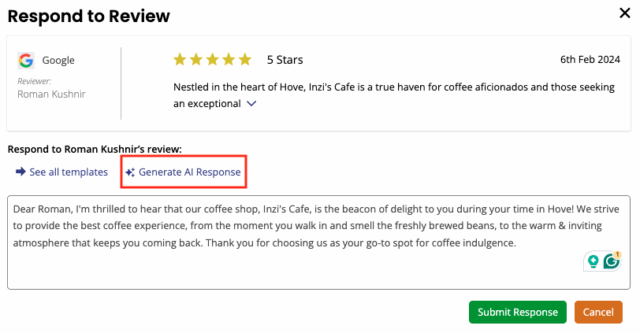
When responding to reviews, begin by thanking the customer (by name) for taking the time to leave their comments. You should then address the feedback in a personable way. Make sure to reference any specific points that they have raised to avoid a ‘cookie-cutter’ response.
If you receive negative feedback, avoid the urge to respond immediately. Instead, take some time to absorb this feedback and to craft an appropriate response. Make sure you supply contact details should they wish to discuss the matter further.
Always responding in a timely and professional way can be tricky. Fortunately, we’ve taken the hard work out of it for you with these review response templates.
Where to Showcase Google Reviews
As well as appearing across Google Search and Maps, you can also add your best Google reviews directly onto your business website. You’ll definitely want to show yours off so that prospective customers can better understand the value of your business.
BrightLocal’s Showcase Reviews widget is an easy-to-use tool that displays your Google reviews on your website. It also allows you to showcase your customer feedback from more than 80 other review sites.
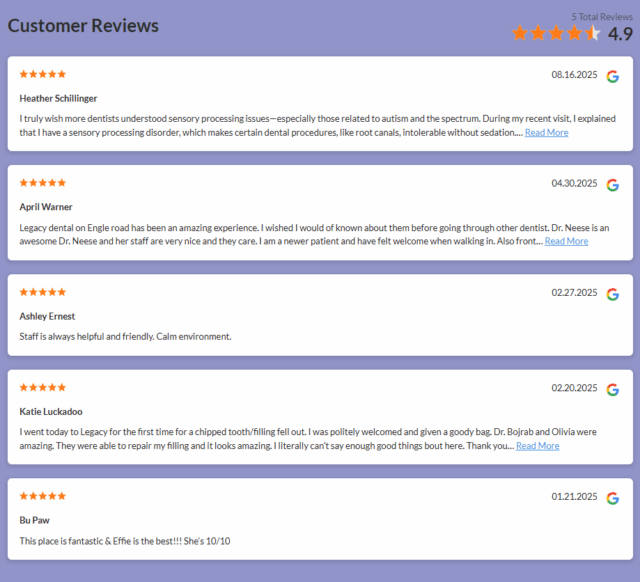
It is also a good idea to use your Google reviews in your marketing materials on off-site channels, including email campaigns, social media posts, and printed brochures, to strengthen your credibility and encourage new customers to choose you.
How to Get Google Reviews For Your Business
Building your online reputation through Google reviews is a free way to increase sales and grow your future profits. But while most people read reviews before making a decision, getting them to write one can take some encouragement.
The good news is that most consumers are willing to leave feedback when asked… so ask! BrightLocal research finds that 70% of consumers have written reviews in the last year. The most common ways of requesting reviews are email, in person, through social media, via text, and on receipts and invoices.
When requesting Google reviews, timing and tone are key. Ask soon after the interaction while the experience is still fresh, keep your request polite and simple, and make it easy by including a direct Google review link or QR code. And don’t be afraid to follow up.
You can also use tools like Reputation Manager to collect more Google reviews for your business seamlessly through personalized email, SMS, and in-store requests, all linking directly to your Google Business Profile. For full guidance and handy templates, visit our guide on how to ask for reviews.
Google Reviews for Business FAQs:
-
How long does it take for Google reviews to appear?
Most Google reviews appear almost immediately, but sometimes it can take up to 48 hours. Delays can happen if Google is moderating the review, if the reviewer is new, or due to technical issues.
-
How many Google reviews do I need to show up in search results?
There is no magic number of reviews required to rank in local search results. The exact amount depends on your location and local competition. Some businesses without any Google reviews can still rank well if other local SEO factors are strong. You should aim to get a steady stream of positive reviews over time to maintain and improve your visibility.
-
What rules do I need to follow for Google reviews for businesses?
Google reviews must be honest and unbiased. Do not offer incentives for positive reviews, filter out negative reviews (known as review gating), post reviews for your own business or competitors, or post misleading content. Reviews should follow Google’s review platform guidelines.
-
Can I turn off Google reviews for my business?
No, Google doesn’t allow businesses to turn off Google reviews. If you are having problems with your Google reviews, you can report those that violate Google’s guidelines and focus on getting more positive reviews from happy customers to improve your overall rating.
-
Can you delete Google reviews?
Businesses cannot delete the Google reviews they receive. However, if the review breaks Google’s review guidelines, you can report the review, and if Google agrees it’s against the rules, they will take it down. Reviewers, on the other hand, can delete their own posted Google reviews at any point.
Take Control of Your Google Reviews
Google reviews for business are powerful. They build trust, guide customer decisions, and boost your visibility in local search results.
Now that you understand how Google business reviews work, it’s time to take control. Ask for reviews, respond quickly, showcase the best feedback in your marketing, and turn every Google review into an opportunity to grow your business.