






In Google’s own words, a Google Business Profile (formerly known as Google My Business) is more than just a business listing.
The free profile makes it easy for businesses to connect with customers across Google Search and Maps, and is pretty much essential if you’re hoping to source new customers online.
Gaining visibility among a local audience is important for any type of business, but especially so for a service-area business (SAB). A business of this nature may see its reach cover a very specific geographical radius, as well as offering targeted expertise or solutions to local consumers at a distance from its own home base.
What is a service-area business?
The term ‘service-area business’ (also known as an SAB) sounds like it refers to any business that, well, ‘serves an area’, right? But no, as far as local SEO needs are concerned, a grocery store that pulls in customers from the local ‘area’ does not count as a service-area business.
Google defines a service-area business as: “A business that visits or delivers to customers directly, but doesn’t serve customers at its business address.”
A service area business (SAB) is a business that:
- Provides a service at the customer’s location (they come to you)
- Serves a wide area beyond the service provider’s immediate location
- Has no physical location which customers can visit
- Needs to ‘hide’ (i.e. not display its address in business listings)
If your business satisfies the above conditions, then it’s a service-area business, and that means there are plenty of online marketing tools, specifics, and processes that apply to you.
Examples of these kinds of businesses include:
- Garage door contractors
- Window cleaning companies
- Locksmiths
- Pest control professionals
- Cleaning companies
- House painting businesses
- HVAC providers
If your business serves customers at its business address, as well as visiting or delivering customers (e.g. a florist store that also does home deliveries to local customers) you have what Google calls a “hybrid business”.
If you don’t serve businesses in your local area and only operate online, then you are not eligible for a business profile.
It’s worth noting that definitions can change, with some using ‘service-area business’ to also include businesses that have a physical location and the ability to deliver a service at your home or office. For the purposes of this piece, I’ll be talking about service-area businesses with no physical location.
No address, no listings?
The lack of publishable address is the key thing differentiating service-area businesses from other local businesses. In local SEO, we often point out that having accurate and consistent NAP (Name, Address, Phone number) data displayed across multiple relevant business listings is very much ‘table stakes’ for online visibility.
Although there are some key business listing sites (or ‘citation sites’) that don’t allow you to hide your address, the good news is that there are plenty of citation sites out there that are a perfect fit for service-area businesses.
Local SEO for service-area businesses
As a SAB, you’ll naturally have a geographical area where you can deliver your services.
It’s up to you to determine what that range is, but whether you serve clients within a 5-mile or 50-mile radius, your business will nonetheless operate within a particular zone and not beyond it.
Because you perform your service at your customer’s location, they don’t have to travel. That means they simply need to find a garage door installer who covers their zip code.
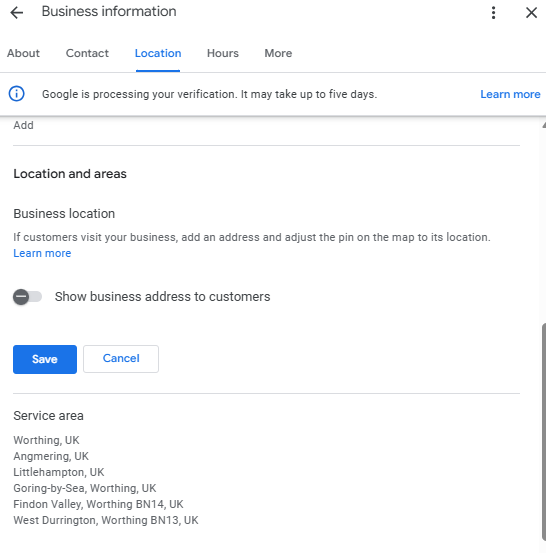
Thankfully, Google Business Profile makes it easy to set up a profile without an address. Simply toggle ‘Show business address to customers’ on setup and you can set up an area of service, rather than having people turn up to your home address expecting immediate garage door assistance!
Boosting visibility on Google Maps
SABs, like other local businesses, can appear in Google Maps and in the Local Pack. How they are shown, though, is a little different.
With a standard GBP listing, your profile is built around your physical location, which may not accurately reflect the wider geographical area you serve.
For SABs, rather than a map pin showing your exact location, Google Maps displays a shape covering all your service areas. This means your home address isn’t shown to potential customers, just the areas you operate in.
Being able to specify those areas makes your GBP listing more accurate and more likely to rank for prospective clients further away from a physical store address, while still being covered by your service business zone in Maps and local search.
Google says that the boundaries of your service area shouldn’t be more than about a two hour drive from your business location, so you can’t exactly set the whole of the USA as your service area and expect it to work. You also can’t set a whole state as your service area.
However, without an exact location, customers who prefer to browse Google Maps to find a business will not see your business on the map itself, just in the list of businesses. Clicking on your business profile will bring up your service area.
Let’s say your garage door business is based in Rochester, New York. A traditional Google Business Profile listing could mean that you don’t show up in local search for a homeowner looking for an installer in Buffalo, 66 miles away, even if it’s company policy to travel up to 100 miles to offer your service.
A service-area Google Business Profile places less emphasis on proximity and allows you to tell Google that you do service Buffalo and should be visible in local search for that customer.
Ranking outside your area
By and large, businesses in the same vertical and location compete for the same audience. Two hotels nearby each other, two Italian restaurants in the same neighborhood, two beauty salons on the same road, they’ll each be targeting the same people, be they visitors to the area or residents.
Things are slightly different for service-area businesses. Their customers don’t have to travel anywhere to provide their custom, and so they’re less likely to base their search requirements on a specific business location. This leads to the proximity of searcher to business being less critical in local search rankings.
So more weight gets put on the other key pillars of local search rankings: prominence and relevance. While Google has some information on the area the business serves, it’ll be much more inclined to rank service-area businesses with a good reputation and great reviews.
After all, if I’m booking a home visit from a pest control company, I’m far less interested in how far they’ve had to drive to get to my house and much more concerned with how many satisfied customers they’ve served.
There are other tips and tricks to help you rank outside your local area, but starting with fantastic reputation management (and leaving a trail of happy customers in your wake) is a good move.
Another powerful way to build relevance across your service area is through dedicated service area pages on your website. While your GBP tells Google where you operate, service area pages give you the on-site signals to back that up.
How SABs can track rankings
Tracking your local rankings as a SAB is a little tricker than a business with a physical location as you need to understand your visibility across your entire service area.
BrightLocal’s Local Search Grid plots your rankings on a map across a grid of locations, giving you a clear picture of where you’re visible and where you’re not. For SABs, this kind of geo-grid view is far more useful than a single ranking position, since your performance can vary significantly from one neighborhood to the next.
How to set up a Google Business Profile for your service-area business
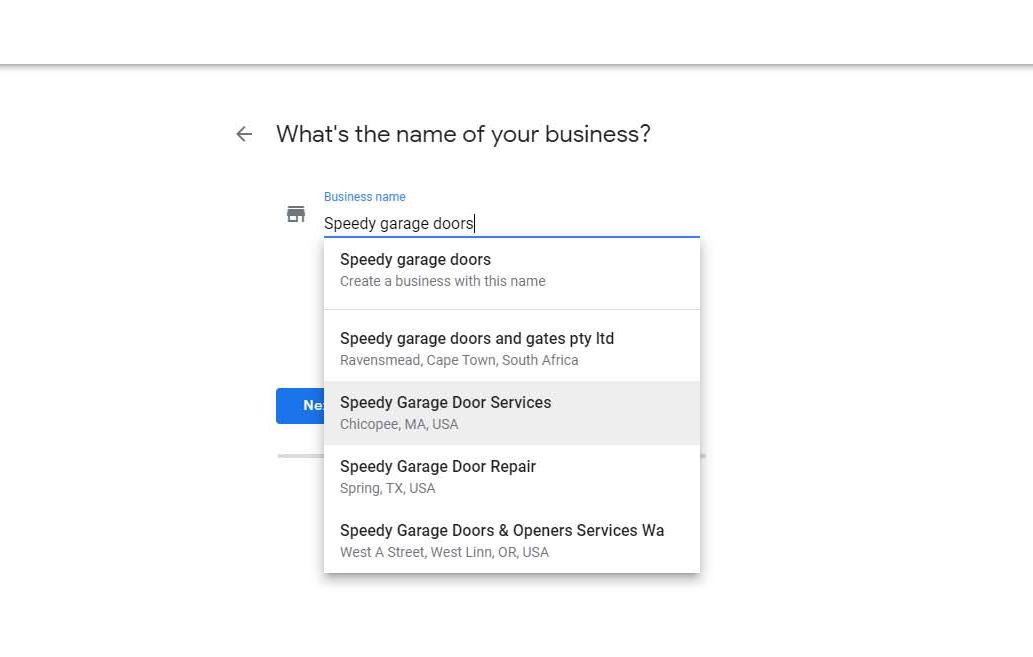
Go to google.com/business. You’ll be presented with a screen that invites you to sign in or manage your business. To create a new listing, you’ll first need to verify that an existing profile isn’t in place. Click ‘manage’ and then, when prompted, add your business name to the search box. A drop-down list will appear, showing any businesses with that name with an existing Google Business Profile. For a new business, there shouldn’t be a listing in existence.
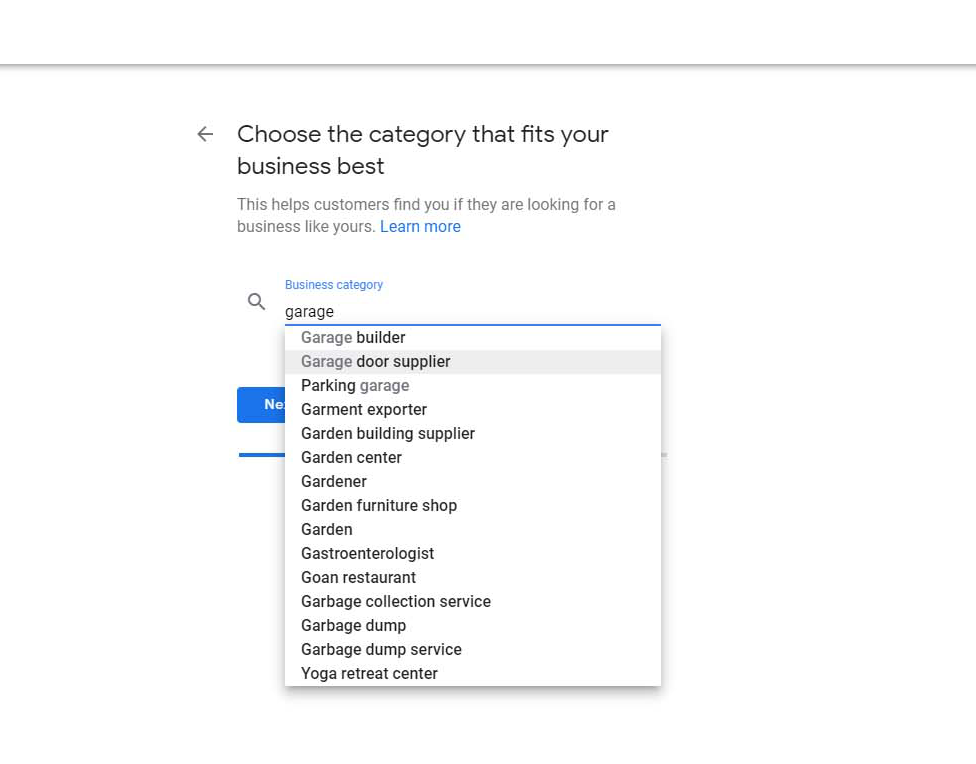
You’ll now be prompted to choose a business category. Enter just your main category for the moment as you can add additional ones later if appropriate.
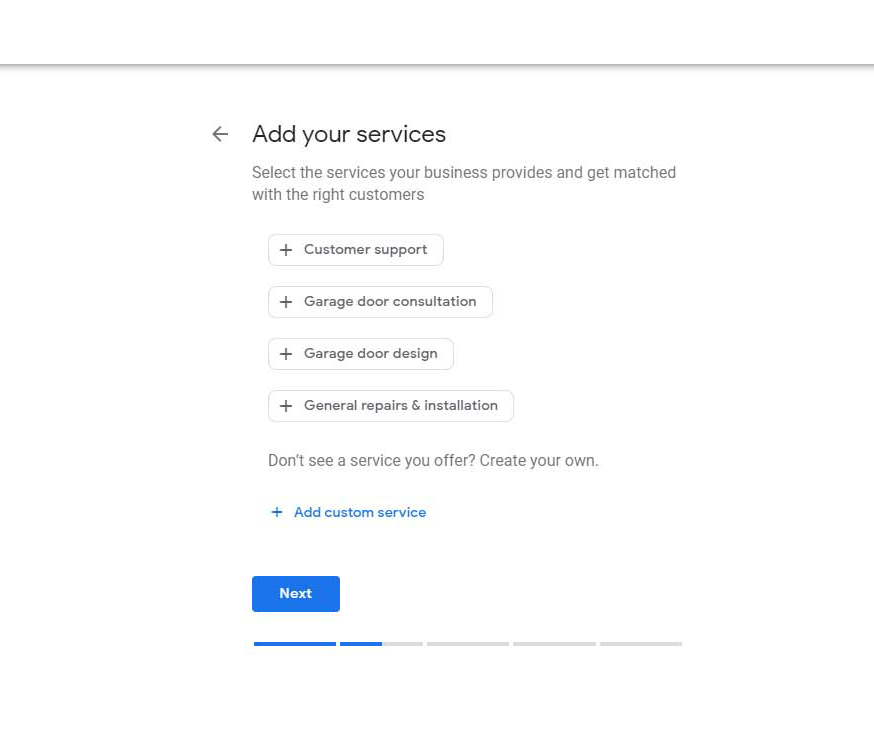
Now, select specific services relevant to your offering. Google will provide a few suggestions to add to your profile, or you can input your own.
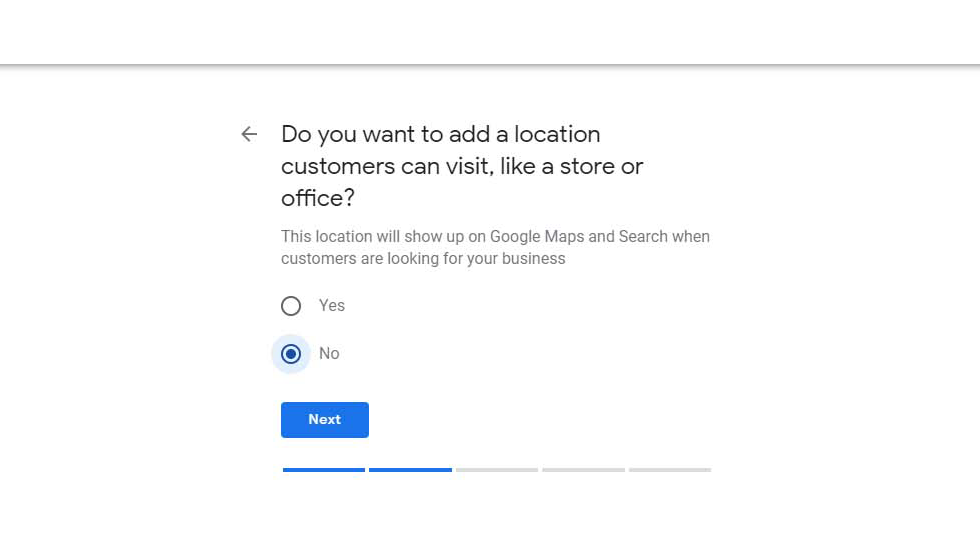
The next screen will ask you if you wish to add an address to your business listing.
This is an important step for your SAB profile creation – select ‘no’ if you are a pure service area business with no physical location (e.g. a showroom that customers would visit).
By opting out of providing a business address, your final listing on Maps and search will also be address-free. Instead, you’ll be asked to confirm the areas that your business services.
If you do have a showroom of some kind that you want people to visit, you’ll need to add your address to your business listing.
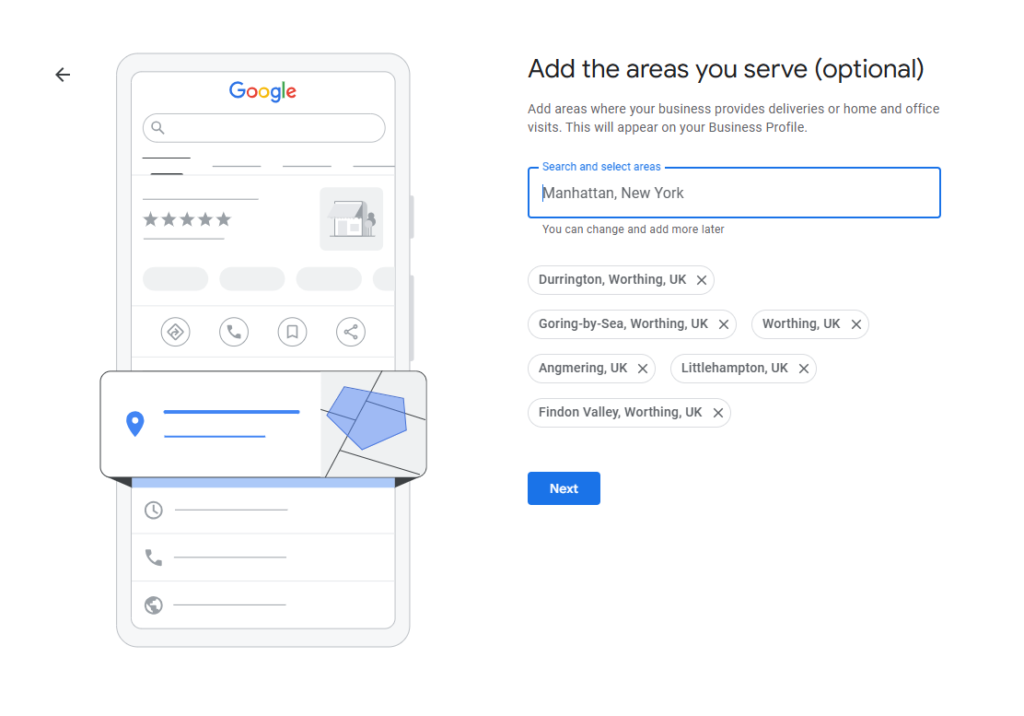
Google will now ask you to define your service area. You can enter up to 20 locations here, using a mix of city names, zip codes, counties, and countries.
To ensure that your full service area is covered, choose a zip code that sits at the outer limit of that area.
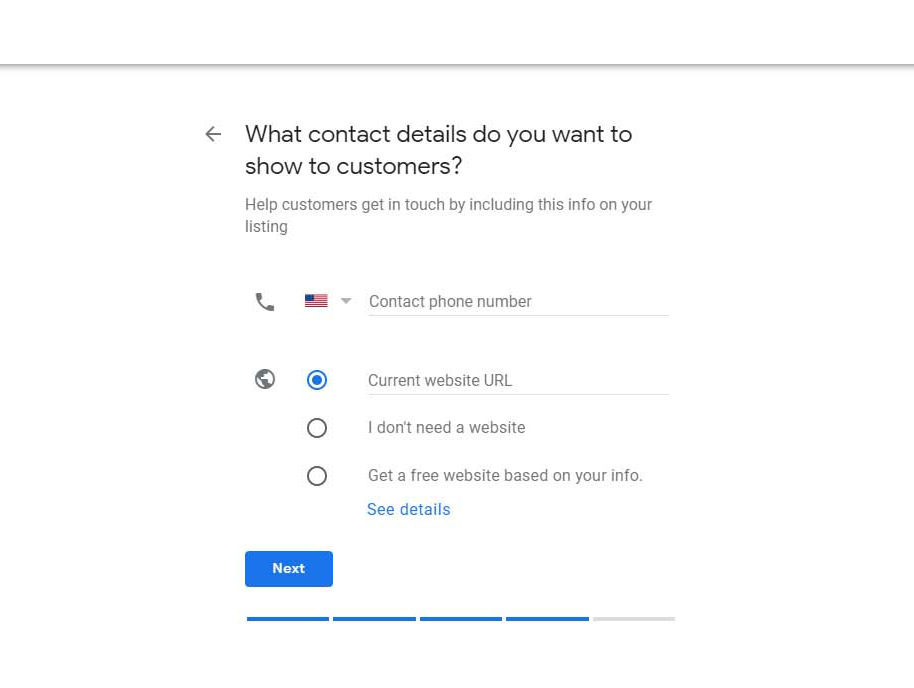
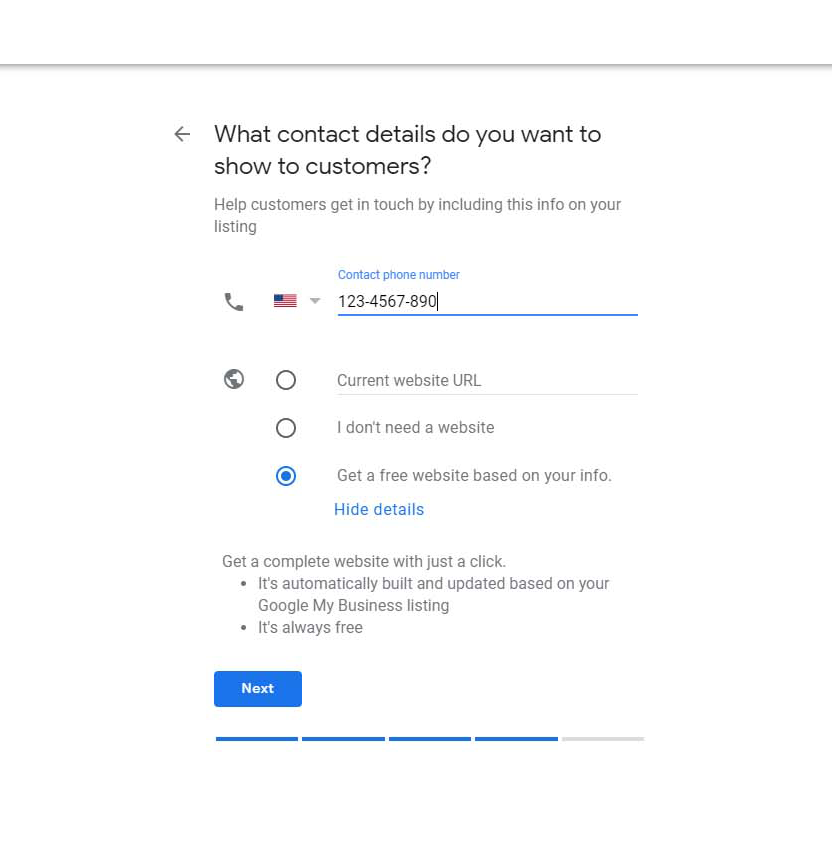
You now need to provide your contact information and website. These details will be displayed on your public listing, so ensure you’re inputting your business number rather than your own private cell phone. When adding a website, make sure it’s the most relevant URL for this Google Business Profile.
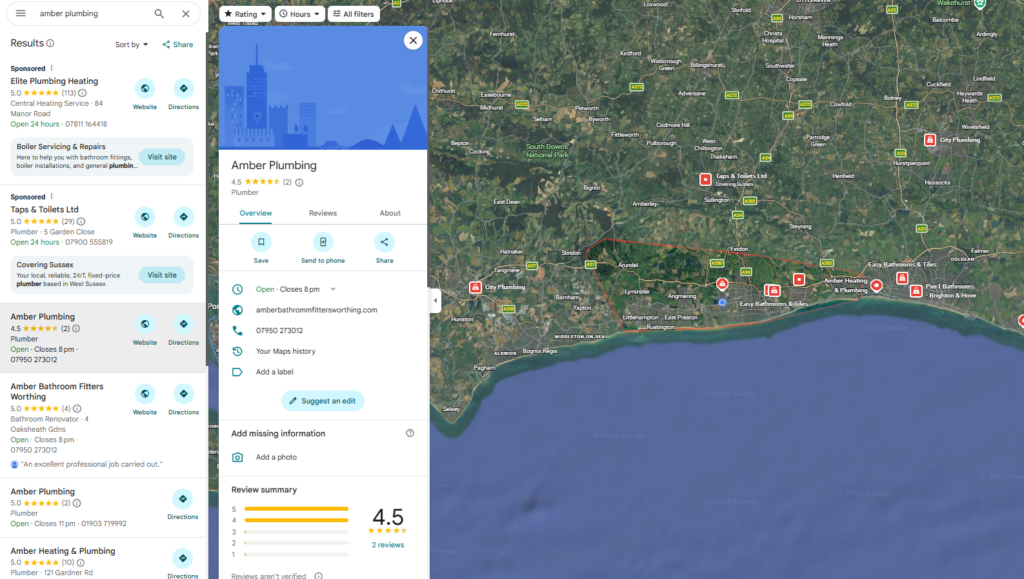
Once you’ve set your service areas, you can view these by viewing your Google Business Profile in Google Maps. You’ll see a red line around all the areas that your business serves, but no map pin. The address will also not be shown on the business profile.
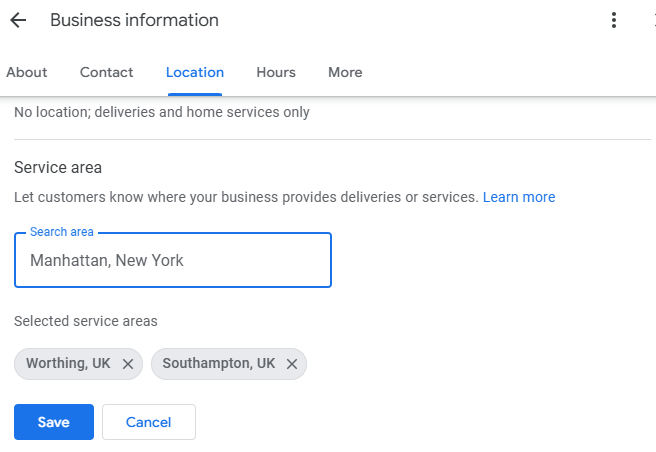
Adding or removing a service area to your Google Business Profile after setup
If you later add a service area or stop serving one, you can remove these easily:
- Go to your Business Profile
- Choose Edit Profile – Location
- Under Service Area, click Edit
- Remove an area by clicking the cross, or add one with the search bar
- Click Save
How to avoid the spam trap
There are often misconceptions about service-area businesses because results for them tend to include more spam than other industries.
This doesn’t mean that your profile will be classed as spam by default, but it’s good to take measures to ensure you’re not falling into spammy tactics yourself — and that customers will view your business as trustworthy and authentic.
You can avoid falling into the spam trap by keeping your GBP up-to-date and active. This includes regularly requesting reviews, responding to them, adding fresh images or videos, and posting updates and offers with Google Posts.
How to optimize your service-area business listing
Once you have claimed your listing and set up the basics of your Google Business Profile, you can proceed to the optimization stage.
Luckily, optimization tactics for a SAB don’t differ too much from regular listing optimization.
Choose the right primary and secondary categories
Choosing the correct category and subcategory for your SAB is one of the most important optimization tasks you can complete – with the primary category being named as the top local ranking factor by experts in the Local Search Ranking Factors Survey.
Upload images
We’ve already mentioned that images can help your SAB listing look less spammy, but they are important for optimization, too.
Results with images are more eye-catching and appealing to the search user, so they can help your Google Business Profile become more engaging and encourage clicks.
A lack of physical location doesn’t mean you can’t get creative with GBP photos, though – include an image of your work van with company branding, for example, or a shot of your factory where the garage doors are made. Images of installed doors on site at a client location could also be used (with customer authorization).
Why not read our complete guide to Google Business Profile photos and looking good online for more detailed guidance?
Engage customers with Posts
GBP Posts provide another engaging and creative way to enrich your local search results.
Posts can almost be thought of in the same way as a social media post, but published on Google Business Profile rather than Facebook or LinkedIn.
Each post can contain up to 1,500 characters, along with images, a CTA button, and a link. You can use this space to share company updates, tell search users about upcoming events, or publish offers.
Regularly using this feature enriches your SAB’s GBP listing and can help you win new business, along with sending optimization signals to Google.
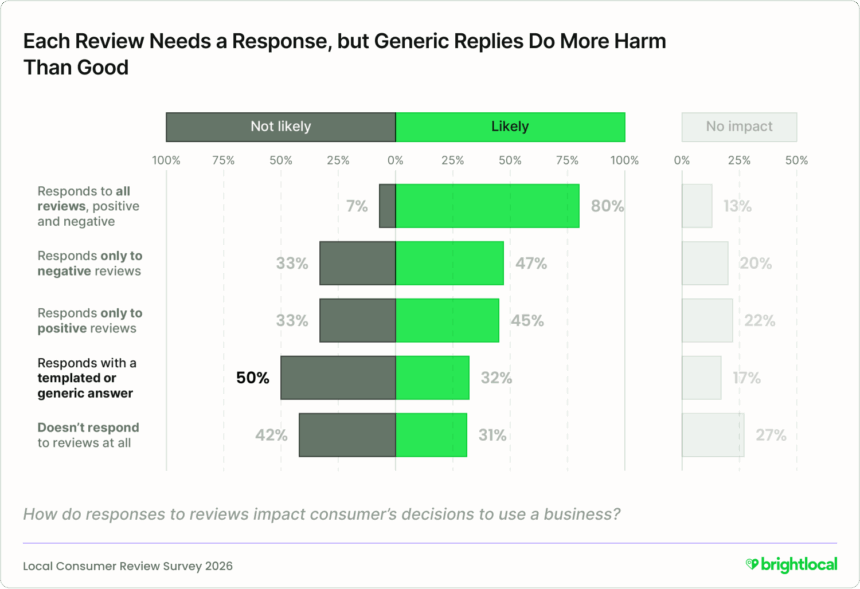
Encourage reviews (and respond to them)
It’s well established that reviews are an important part of the consumer decision-making process and help nurture trust, but they also play an important role in local search optimization.
The addition of fresh new reviews (along with a response on your part) ticks a number of Google boxes, feeding it both fresh content and crowdsourced opinion on the trustworthiness, prominence, and credibility of your business.
Source: Local Consumer Review Survey 2026
Local Services Ads
Because service-area businesses don’t have the capability of showing up with a map pin in Google Maps, they can sometimes lose out to searchers who prefer to browse the local map when looking for a business.
This is one of the reasons that Google launched Local Services Ads, a feature of Search Engine Results Pages (SERPs) specific to searches that return service-area businesses as results.
Local Services Ads is a listing type that sits atop SERPs and provides reputation and service information prominently for the searcher. It’s a changing product, with some elements coming with a charge from Google (such as the ‘Google Guaranteed’ badge), but it’s worth reading this guide on service-area businesses for a good overview of the opportunities presented by Local Services Ads.
That’s all, Folks!
Setting up a GBP listing for your SAB and conducting ongoing optimization tasks and audits are essential for local search and Maps visibility, but this process shouldn’t be complicated or overwhelming.
The process of claiming your listing and providing required information is straightforward, though you do need to give careful thought to choosing a business category and defining service areas to ensure your whole zone is adequately represented.
Simply inputting cities or zip codes covered doesn’t guarantee local search or Maps visibility but, if you follow our optimization tips, you’ll soon be well on your way to improved SAB visibility.